Skip to content
ANANAS24 PL · EN · DEBook a demo call Try the demo
For in-house IT

A command centre for your in-house IT.

Server, network and backup monitoring, incident response, tickets from staff and a hardware register that fills itself in. Plus the documentation a NIS2 auditor will ask for. ANANAS24 is built for IT teams and one-person IT departments in companies with a dozen, a few dozen or a few hundred computers. From €59 a month excl. VAT, which is less than one hour of the whole company waiting for the server to come back ;)

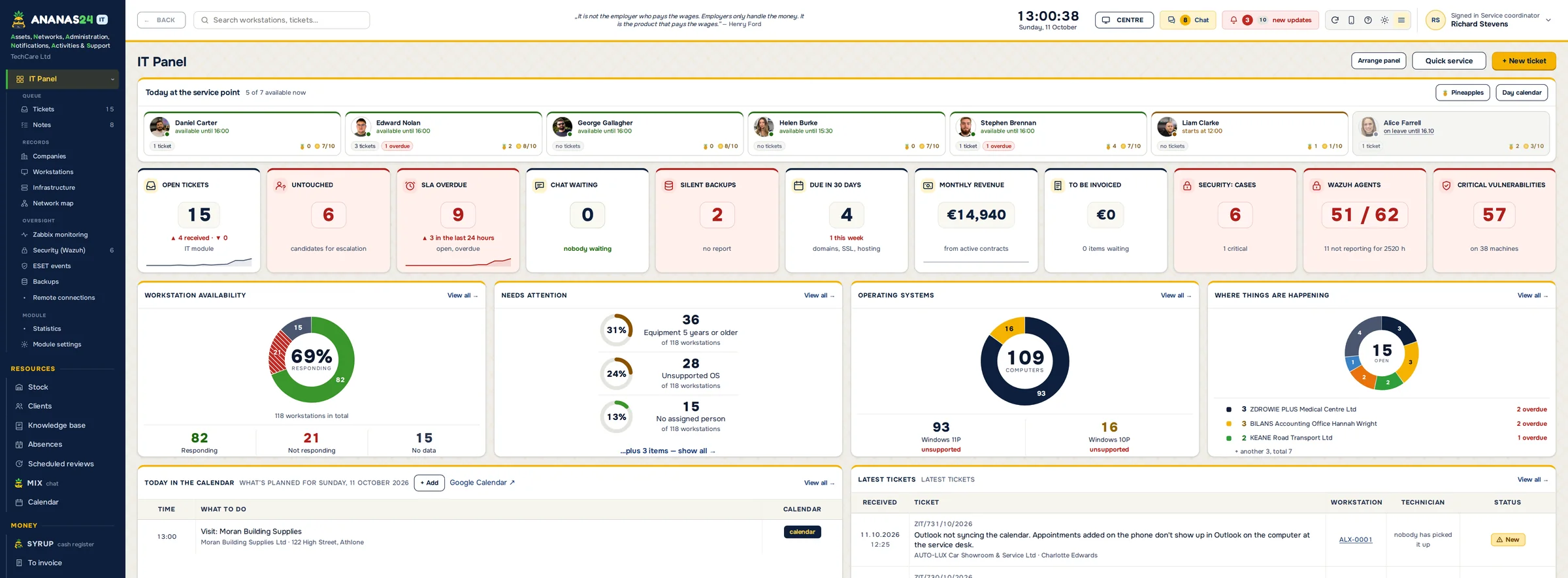
ANANAS24 IT panel: workstation availability, overdue tickets, backups, operating systems and latest tickets – sample data

Sound familiar?

Requests come from everywhere.In the corridor, on Teams, by text and on a sticky note on your monitor. Half of them get lost, and somehow it is still your fault.
All the hardware knowledge lives in your head.Who has which laptop, when the warranty ends, where the Office licence is. You go on holiday and nobody knows anything.
You hear about outages from the CEO.The server disk is full, the backup hasn't run for a week, and you are the last to know.
An audit is coming and the docs are a spreadsheet from 2019.NIS2, your insurer or a new board want to know what you have and who can access what. Cue the paperwork, due yesterday.

ANANAS won't give you a second IT person, but it will take half the running around off your plate.

TICKETS FROM STAFF

Staff report a problem in thirty seconds, and you lose nothing.

Everyone gets their own link or QR code, with no accounts and no passwords to remember. For reception or the shop floor, one shared link for the whole site is enough. The employee describes the problem, picks their workstation from the suggestions and, before sending, sees a "try this yourself" tip from your own procedures.

Then they can see who is on it, chat with you and send a reminder instead of catching you in the corridor. On your side the ticket has a priority and a deadline, and your phone reminds you an hour before it is due.
Nothing gets lost.A ticket nobody has picked up stays on the dashboard until someone takes it.
Emails too.Messages to your IT mailbox can turn into tickets automatically, through an automation such as n8n.
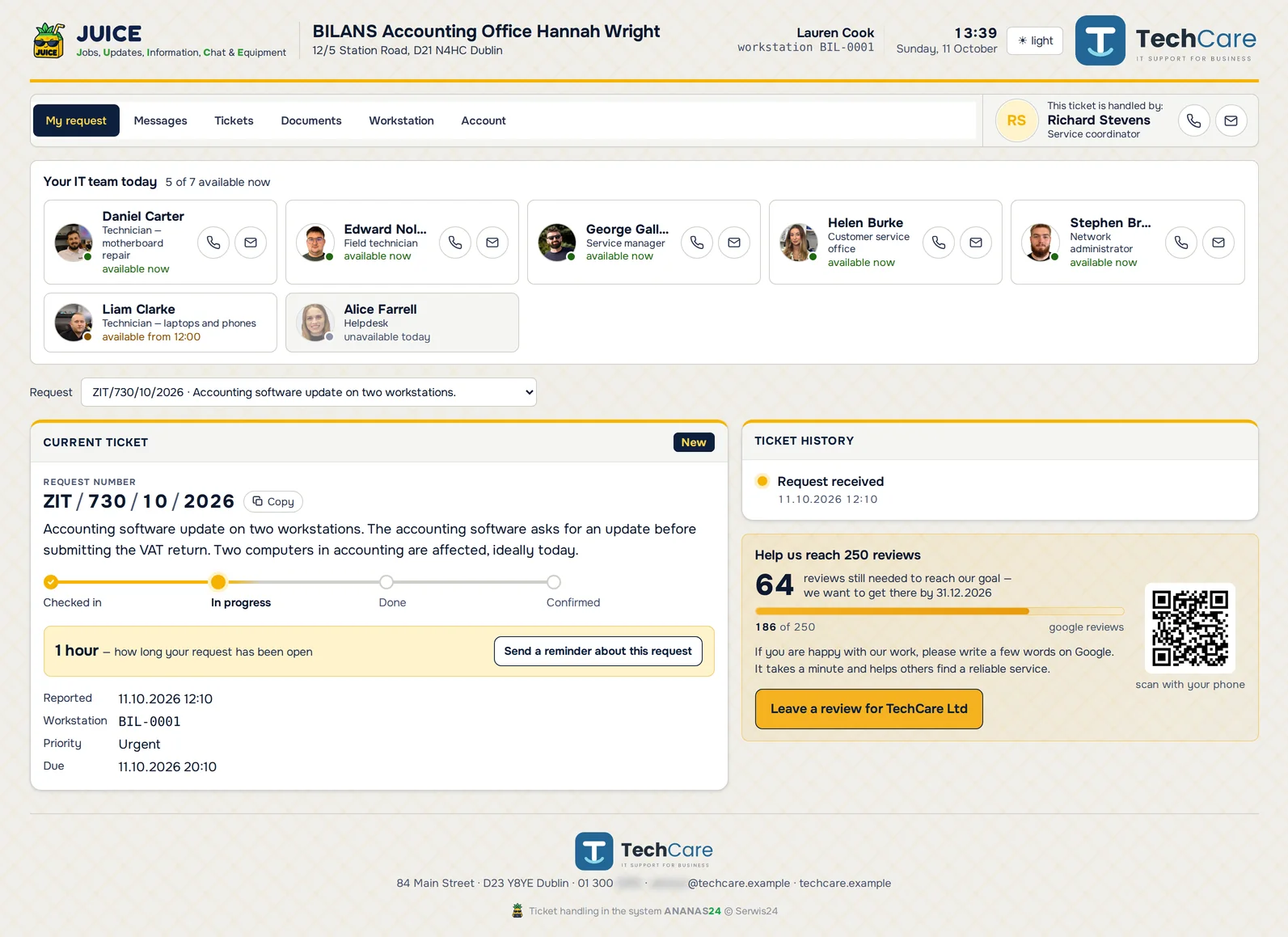
Staff request portal: the current ticket with progress, who is available in IT today and a reminder button – sample data
What the employee sees: their tickets, a chat with IT and a button for a new request.
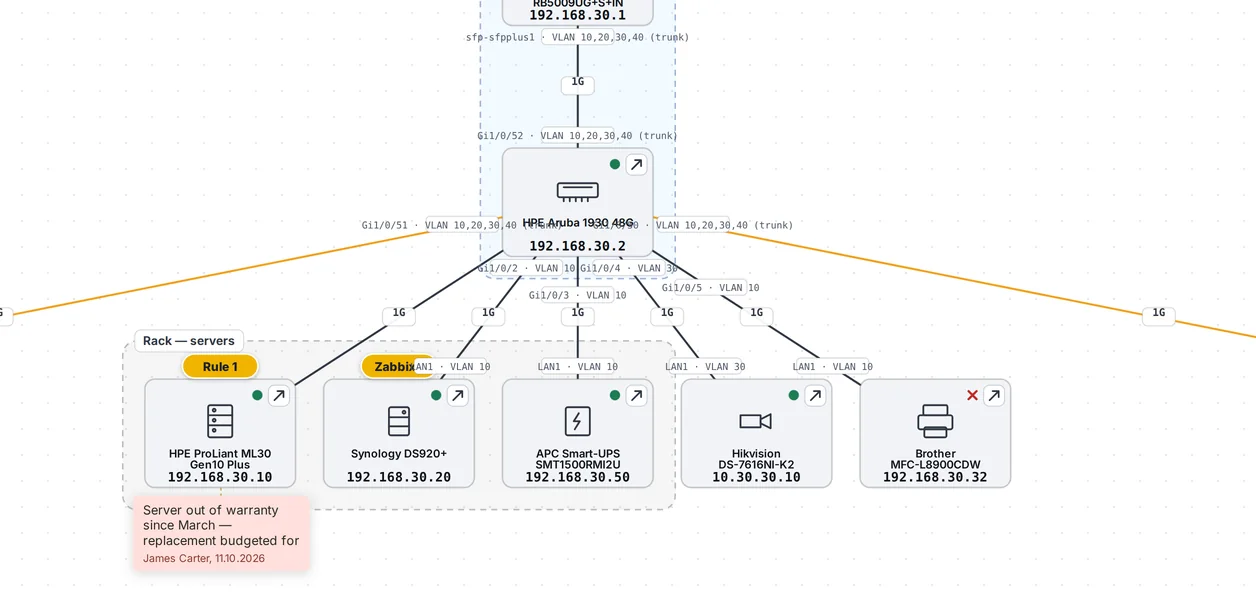
Network map in ANANAS: switch, ports and VLANs, devices in the server rack zone with a sticky note and event badges – sample data
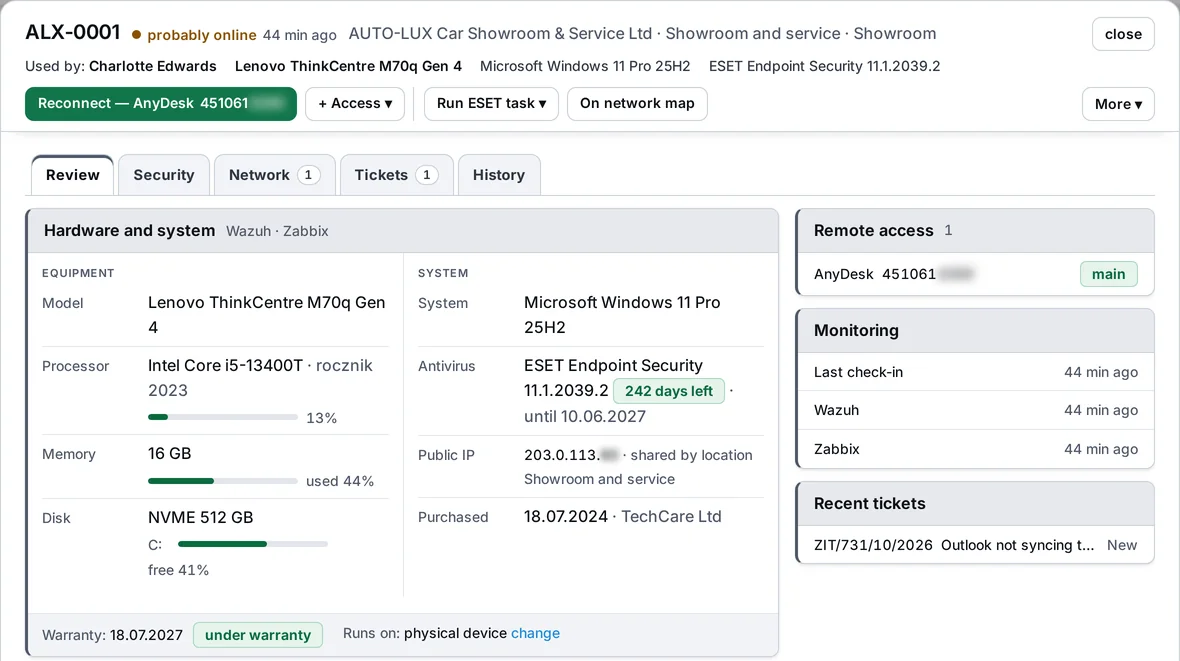
Workstation card ALX-0001: who uses it, model, processor, memory and disk load, system, antivirus, warranty and monitoring – sample data
HARDWARE REGISTER AND DOCUMENTATION

A hardware register you never have to retype.

Every few hours ANANAS pulls data from ESET, Zabbix and AnyDesk on its own: CPU, disk, operating system, antivirus and last contact. Wazuh adds the CIS score and known software holes. You only add what no tool knows: who sits at the computer, where it was bought and when the warranty ends.

The workstation card holds licences, IP address, load, detections and the full ticket history, with every change and every remote session on a timeline. Switches, printers, UPSs and NAS boxes get their own cards, and the network map shows what is plugged into which port.

Hardware list for accounting?Pick the columns and get an Excel file with your company logo.
Renewals under control.Domains, SSL certificates and hosting remind you before they expire.
MONITORING AND BACKUPS

You hear about outages first, not from the CEO.

Zabbix, ESET, Wazuh and backups flow into ANANAS. Every problem comes with one sentence: what happened and what to do. One click turns it into a ticket, and when Zabbix marks the problem as resolved, it closes on your side too. You can cut an infected computer off the network straight from ANANAS, and every incident has an owner, a history and a trail in the log.

An alert you can’t miss.When a server goes down, a backup fails, the antivirus can’t deal with a threat or Wazuh sees a serious event, a pop-up and a phone notification come back every 10 minutes until someone on the team clicks “I’m on it”. At night only truly critical things wake you up.
Alerts with thresholds.A disk that will be full in a few days, a silent backup, RAM or CPU in the red. You set the threshold, and the alert fires once and only reminds you after the time you choose.
Night report.Each morning an email sums up the night: tickets, alerts, detections and backups.
Logs and security from Wazuh.Suspicious sign-ins, new admin accounts and stopped services as cases to handle. Plus the CIS score and known software holes on every computer, and a vulnerability turns into an “update” ticket in one click.
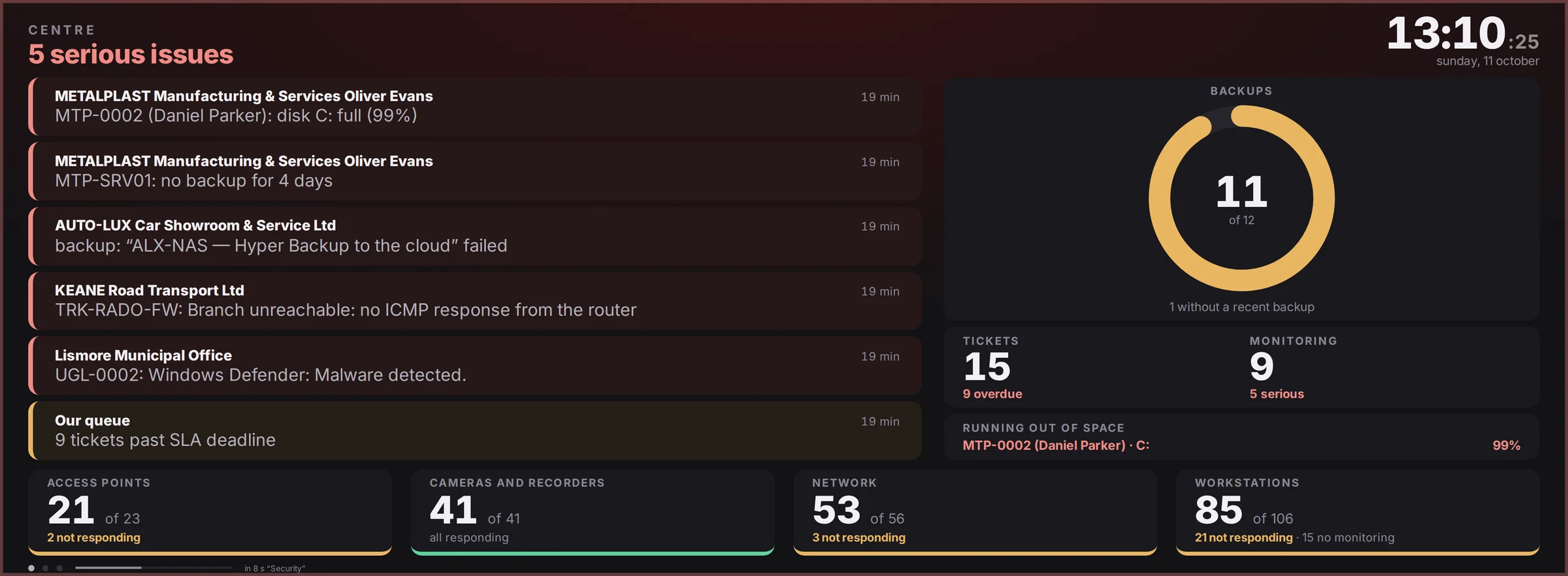
A TV in the IT room.The Now, Security and Day screens rotate on their own, and the frame takes the colour of the worst alert.
Teams hears it too.An alert can be passed on, for example through n8n to a Teams channel.
Zabbix problem list in ANANAS with a one-sentence explanation, status and Take and Resolved buttons – sample data
ANANAS board on a TV in the IT room – sample data
NEW · ONE-TIME PASSWORD LINKS

Send a password to a colleague with a link that works once.

You type the password in a ticket, on the company card or in the password generator, and ANANAS gives a one-time link. Your colleague opens it, sees the password and the content disappears from the server. The browser does the encryption and the key lives only in the link, so the program’s database holds nothing anyone could read.

your-company.ananas24.pl/h/7Qm2xK#key-only-in-the-link
Only the browser knows the part after the # sign. The server receives encrypted content and never sees the key.
YOU → COLLEAGUE“Send password”The password for a mailbox, Wi-Fi or a new account reaches your colleague without an email with the password in it.
Read once.Once read, the content disappears from the server and the next attempt shows “already read”. The password appears only after clicking “Show”, so a mail scanner that opens links on its own will not use up the read.
Expiry and a code by phone.The link works for 7 days, 24 hours or 1 hour. Optionally add a 6-digit code you give by phone. Five wrong attempts and the message is destroyed.
Mailem, SMS-em, w JUICE albo sam.The program sends the link, or you copy it and send it through another channel. Then the key never reaches the server at all. One click revokes the link.
COLLEAGUE OR VENDOR → YOU“Request credentials”A colleague or a software vendor types the login, password and server address into a form instead of dictating them by phone or writing them in an email.
Encrypted with a key kept outside the database.The technician reads the data with “Show data”, and every view is logged: who and when.
They delete themselves.After clicking “Configured, delete”, when the ticket is closed or after 14 days.
A trail without the content.On the ticket you see who got what, how and when, whether it was read and until when it is valid. The password itself never appears in the log, exports, search, reports or AI.

For security audits: credentials travel outside email, with a one-time read, automatic deletion and a log trail. ANANAS is not a password manager and does not keep passwords permanently. Your company’s passwords stay in your password manager.
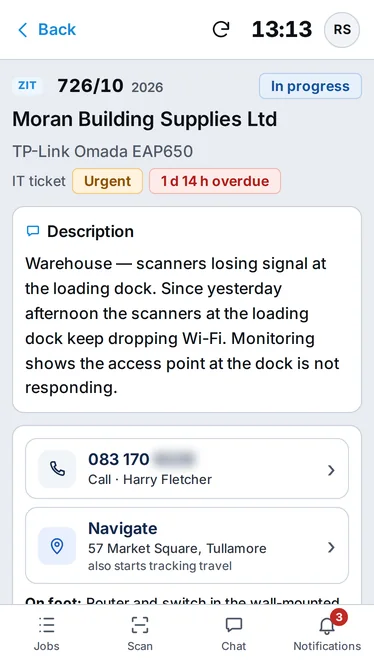
IT ticket card on a phone: description, call and navigate buttons – sample data
REMOTE AND ACROSS SITES

One click and you are on the employee's computer.

From the ticket card you connect through AnyDesk, TeamViewer, RDP or SSH, and every session is logged on the ticket. A green dot next to the workstation tells you whether the computer is even on before you start calling.

Several sites? Each one has its own workstations and its own request link, and whoever goes on site has ANANAS on their phone: tickets, photos, closing with a note of what was done, and notifications, with nothing to install from an app store.

FOR THE BOARD AND THE AUDITOR · NIS2

The board sees IT at work. The auditor sees you have things in order.

In-house IT usually gets noticed only when something breaks. ANANAS shows the rest too: how many issues you closed, how fast, and what is under control. When a NIS2 audit comes, the documentation is ready, because it built up during everyday work.

Team statistics.How many tickets came in, how many were closed, typical resolution time and how many met the deadline. Plus a "are we keeping up" chart.
Numbers for the CEO.A portal link where decision-makers see what IT is doing, with no names and no digging through the system.
Change log.Who, when, what and why. It can't be wiped from within the system.
Audit documentation.Hardware, licences, backups, IP addressing, procedures and deadlines, collected as you go, not the night before.

Your day doesn't have to start with firefighting.

This is an ordinary Tuesday for in-house IT with ANANAS. Less running between floors, fewer calls and no more "whose job was that?".

Your Tuesday with ANANAS
7:45
Coffee and the night report.
The night-shift report is in your inbox: tickets, alerts, detections and which backups ran or didn’t. When you log in, ANANAS adds what’s in today’s calendar and what’s overdue.
8:20
Accounting reports the printer.
Anna clicks her link or QR code, picks her workstation from the suggestions and describes the problem. She sees who’s on it, and you click AnyDesk on the ticket card and you’re already on her computer. The phone never rang.
10:05
The file server disk.
Zabbix sees it will be full in 9 days. ANANAS raises an alert before anyone notices, and you know right away which server it is and how much time you have.
11:30
ESET found something.
The detection lands as a task with one sentence: what happened and what the risk is. You tick them off in bulk or leave a note on why you’re letting it go.
13:15
Where is that printer plugged in?
You open the network map: switch, port, VLAN. The workstation card also shows licences, warranty and who sits there.
16:00
The CEO asks what IT actually does.
You send a portal link where he sees the numbers on the team’s work, without names. And the TV in the IT room turns red only when something is really on fire.
NEW · NOTIFICATIONS

Everyone chooses what lands in their bell.

In the company settings you choose which kinds of notifications are created at all, with how many there were in the last 30 days. For new tickets you can keep only those reported by the client: from the portal, the form or email. Each employee can also mute what they don’t need.

Switched off means never created.A switched-off kind takes no space in the bell, the counter or the phone.
Everyone sets their own.“What to show in the bell” in the bell or “My notifications” in the account menu. It covers phone notifications too, and the rest of the team keeps getting them.
Clean-up with one button.Mark old unread notifications as read for everyone at once.

Costs less than one hour of company-wide downtime.

You only pay for the number of IT people. Computers, staff reporting through the portal, sites and integrations are unlimited. Every plan has every feature, the only difference is the size of your IT team.

Green

up to 2 technicians
€59/ month, excl. VAT
Save with yearly: €47.20 / month (−20%)

Ripe

up to 5 technicians
€109/ month, excl. VAT
Save with yearly: €87.20 / month (−20%)

Gold

up to 15 technicians
€199/ month, excl. VAT
Save with yearly: €159.20 / month (−20%)
14 days free, on your own data.You fill in a short request and confirm it with the link in your email. We switch the trial on within one business day: the full program for two weeks with sample data, login details by email. Six “First steps” on the home screen walk you through the settings, and one button removes the samples. 3 days before the end we remind you about payment. After the trial the program switches to read-only and your data stays: pay and keep working.
Call: +48 780 014 330

You pay by card through Stripe, in euros or US dollars, and the subscription renews automatically. EU businesses with a valid VAT ID pay no VAT (reverse charge). Prefer a bank transfer against an invoice? Write to us. You get access to ANANAS24 within one business day.

Bigger IT team? Drop us a line and we'll work something out.

Included: help with setup, moving your data from your previous program, and support from people who use ANANAS every day themselves.

No time to set it up? We'll do it for you.

We come over or connect remotely and set ANANAS up for your company: your systems, your procedures, your people. If you don’t have Zabbix, Wazuh or ESET PROTECT yet, we’ll install and connect them. If you want automation, we’ll set up n8n, and if AI must run without sending data outside, we’ll put a model on your own server. You get a working tool and team training, not a manual to read.

Custom setup
from €690
excl. VAT, one-off. Quoted after a short call.
Let's talk about setup
FAQ

Questions your boss will ask

Can’t see your question? Email or call us. You’ll get an answer from someone who uses ANANAS every day.

Do staff need accounts?

No. Everyone gets a personal link or QR code, and one shared link per site is enough for reception or the shop floor. Staff who only report problems don't count towards your plan.

I'm the only IT person. Which plan?

Green, for up to two people with access to the IT panel: €59 a month excl. VAT, or 20% less when paid yearly.

We don't have Zabbix, ESET or Wazuh.

ANANAS works without them, and you only connect what you use. If you want to start monitoring your network, we'll set it up as part of onboarding.

We fall under NIS2. Will ANANAS help?

With the monitoring, incident response and documentation part: Zabbix, ESET and Wazuh monitoring (sign-ins, account changes, vulnerabilities), an incident register, a change log and a hardware register. The program can’t replace your procedures and people, but the audit evidence is already collected.

Where is our data?

With us, on servers in Poland (EU), or on your own Windows or Linux server, whichever you prefer. Every company has its own separate database.

How do we move what we already have?

Much of your hardware will import itself from ESET, Zabbix and your AnyDesk address book. We'll move the rest from your current system if you send us its database.

Can the AI see our employees' data?

By default it gets no personal data. If you want to be sure nothing leaves your company, connect a model running on your own server.

We have several sites.

Each site has its own workstations, network and request link. Plans count IT people, not sites or computers.

Can I see how it works first?

Yes. Leave your email in the form at the bottom of the page and you're clicking around the demo with sample data straight away.

Do you run IT for other companies? See ANANAS24 for IT service providers.

Try the demo.

Leave your name, email and company, and you get instant access to ANANAS with sample data. You click around the real program, not a slideshow.

Try the demoPricing