Skip to content
ANANAS24 PL · EN · DEBook a demo call Try the demo
Be one sharp pineapple.

Infrastructure and incident monitoring for NIS2. Without a million-euro SOC.

ANANAS watches servers, networks, backups and workstations across all your clients, from small businesses to public bodies. Zabbix, ESET and Wazuh detect, and you get the point: what happened, where and what to do about it. You react right away, you can even cut an infected computer off the network, and every incident has an owner, a history and a trail in the log. Full control over what happens at your client’s, and the documentation an NIS2 auditor will ask for ;)

ANANAS24 mascot: a pineapple in sunglasses with a laptop
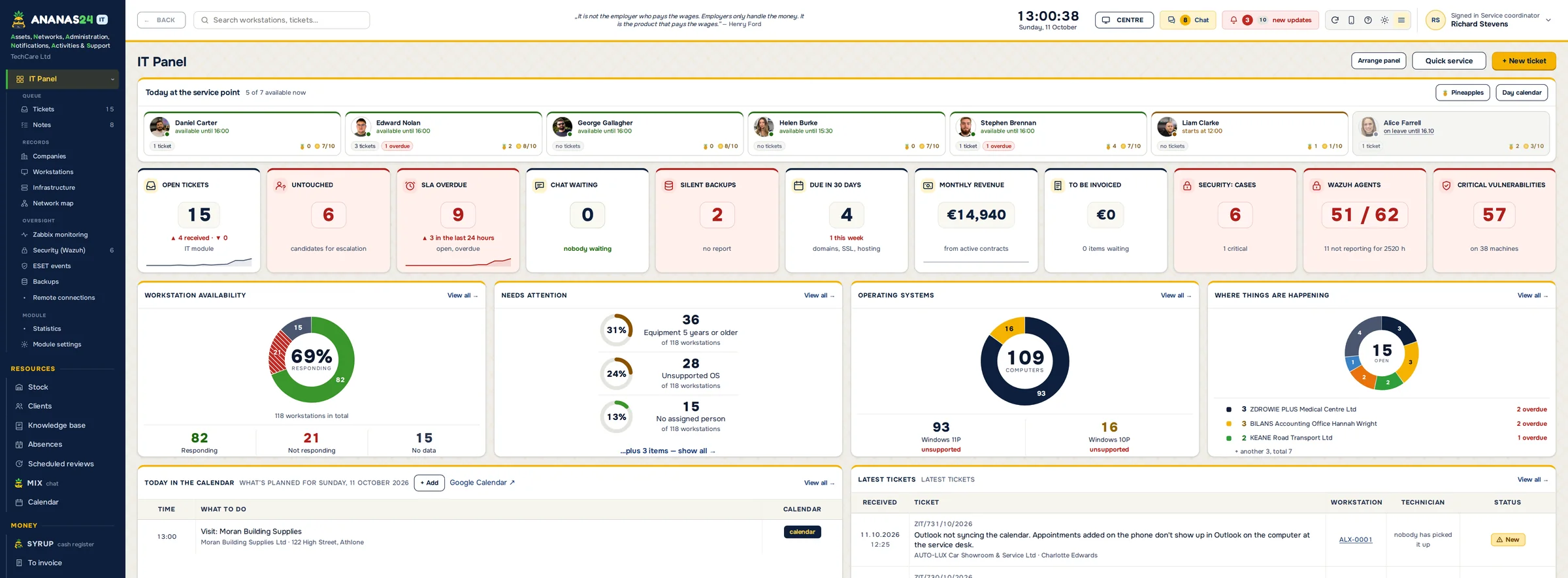
IT dashboard in ANANAS24: workstation availability, tickets past SLA, backups, operating systems and latest tickets (interface in Polish)
What's inside

Meet the crew in shades.

Every part of ANANAS has its own name, so everyone in the office knows what you mean: “send it through PACT”, “the client has it in JUICE”, “ping me on MIX”.


ANANAS24
IT Service Management
PACT
Estimates & Technical Reports
JUICE
Client Portal
MIX
Team Chat
DROP
Online Repair Request
PULP
Device Check-In
SYRUP
Cash Register
Running IT inside one company, not for clients?If you look after IT for your own company, there's a separate page for you: tickets from staff, a hardware register that fills itself in, and audit-ready documentation.
ANANAS24 for in-house IT →

You can finally close the Zabbix console.

EVERY MORNING

The night report is waiting before your coffee is.

Twice a day ANANAS gathers everything from the shift: Zabbix problems, backups that didn’t run, ESET detections and new tickets. AI adds a short hint to every item. The technician sees the report in a window at first launch, clicks an item and is right on the case. They tick “Read it”, and the manager sees who read it and who’s pretending they never got it ;)

Zabbix, ESET and Wazuh do a great job, but their consoles aren't something you want to stare at all day. ANANAS takes what matters from them and shows it on one screen, together with backups. Every alert comes with a short explanation of what happened and what it could lead to, plus the technician handling it and the status. If someone decides a detection is harmless and dismisses it, they have to write down why.

The program predicts when a disk on a client’s server will fill up, checks whether backups actually ran, SQL database backups included, and only speaks up when something’s wrong. You can scan an infected computer or cut it off the network straight from ANANAS, without logging in to the ESET console. The office TV shows the state of every client at once.
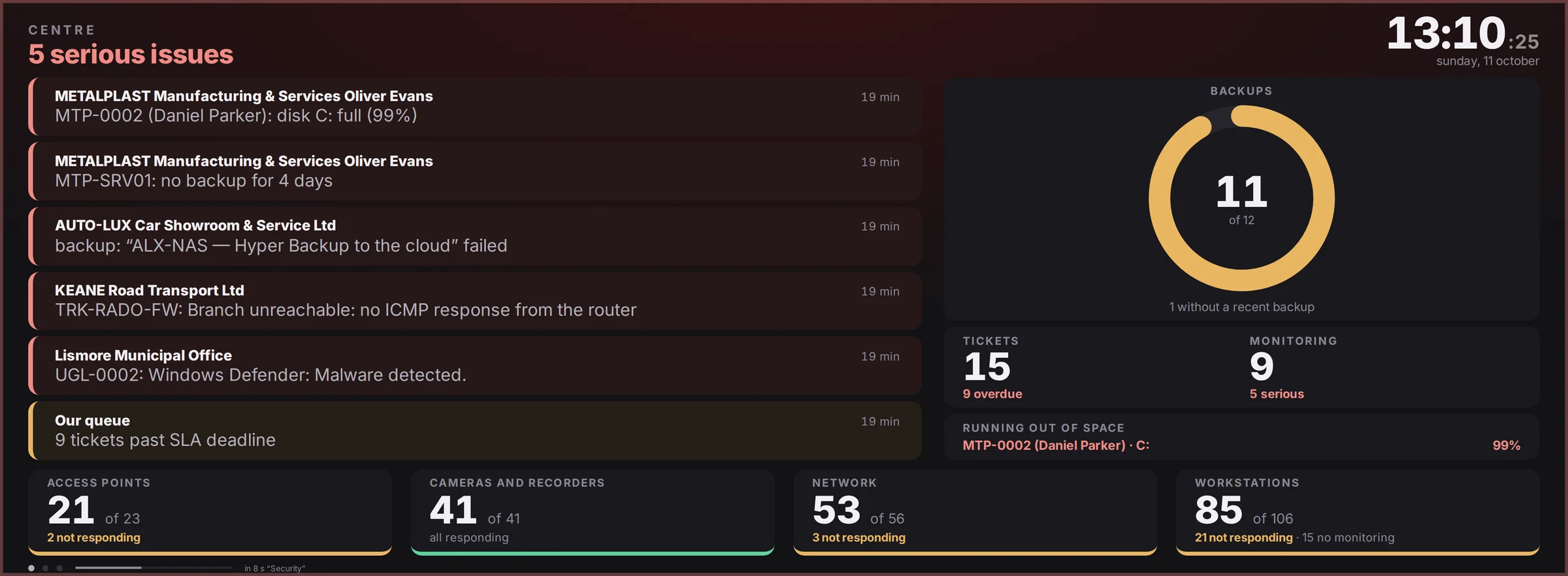
ANANAS dashboard on an office TV – sample data

A board for the office TV. The Now, Security and Day screens rotate on their own, and the frame takes the colour of the worst alert.

Monitoring · Zabbix problems
Zabbix problem list in ANANAS with a one-sentence explanation, our status, severity and Take and Resolved buttons – sample data

Under every alert there’s one sentence: what’s going on and where to look. Take it, fix it or dismiss it, and any alert turns into a ticket in one click.

NEW · SECURITY FROM WAZUH

Know who is guessing passwords on your client’s server.

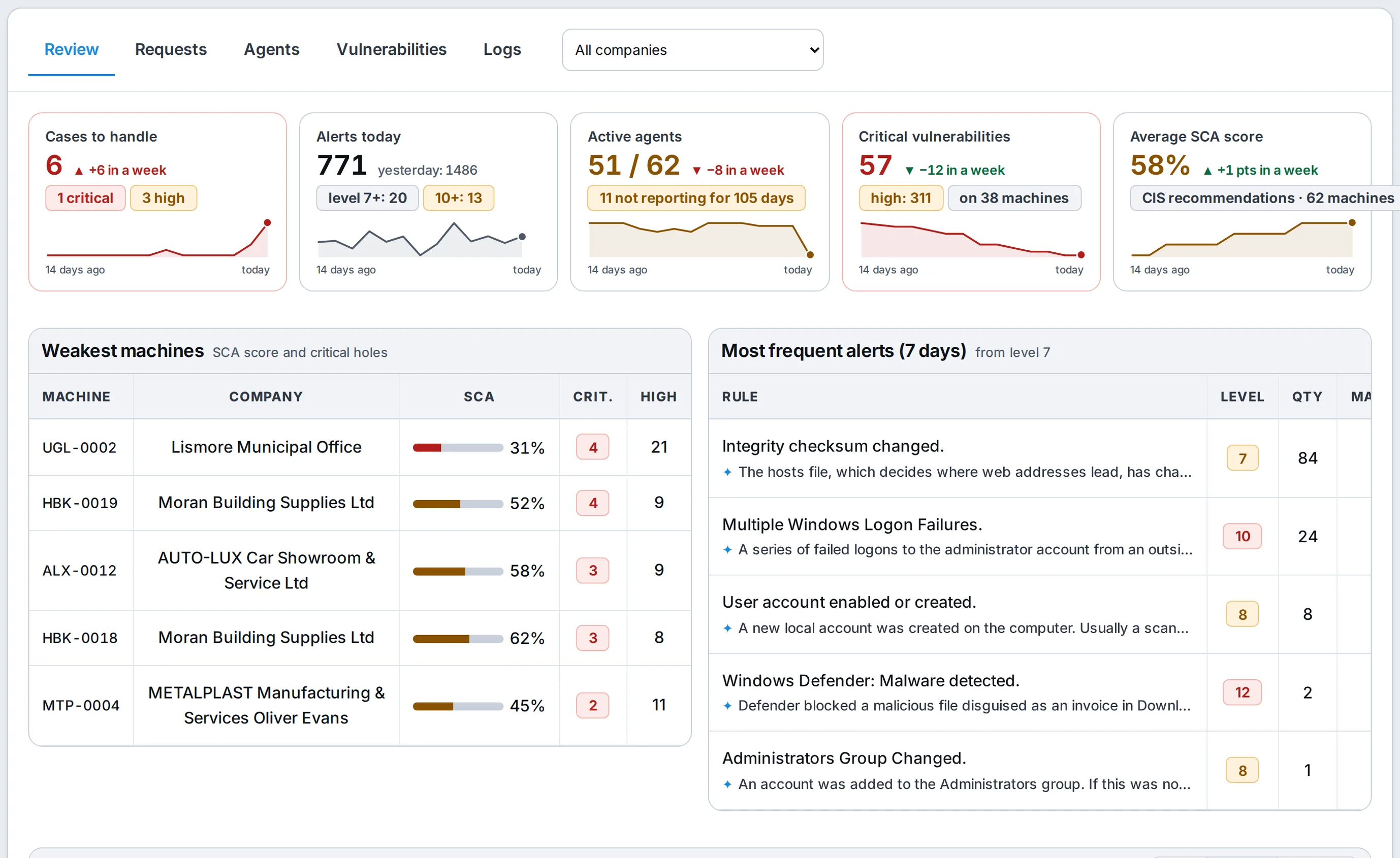
Wazuh reads the logs of your clients’ computers and servers: sign-ins, new admin accounts, services and protection being switched off. ANANAS turns that into a list of cases with a technician and a status, scores every machine against CIS recommendations and shows known holes in installed software. The Security screen gives you an overview, cases, agents, vulnerabilities and logs, and every workstation shows its own score.
Zabbix tells you if it works.Servers, network, printers and NAS. A disk about to fill up and a UPS running on battery.
ESET tells you what it found.Threats on your clients’ computers, and whether the antivirus dealt with them.
Wazuh tells you what is going on.Sign-ins, accounts, services and system events, plus CIS compliance and CVE vulnerabilities.
Security (Wazuh) screen, Review tab: cases to handle, alerts today, active agents, critical vulnerabilities and the average SCA score with a 14-day trend, plus the weakest machines and most frequent alerts – sample data
Overview: cases, alerts, agents, vulnerabilities and the average CIS score with a 14-day trend. Below: the weakest machines and the most frequent alerts, each with a plain-language explanation.
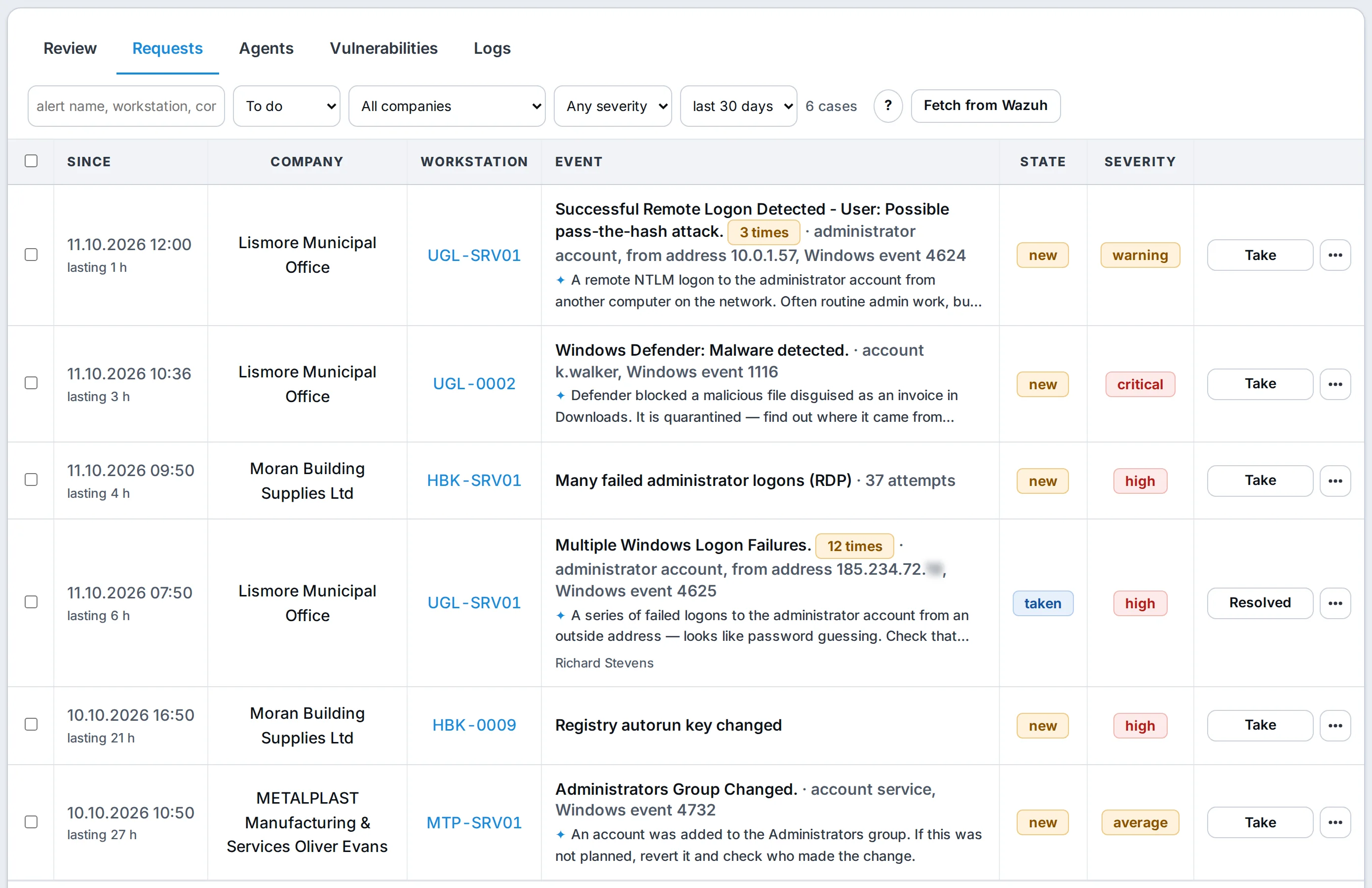
Requests tab: Wazuh alerts grouped into cases with company, workstation, repeat counter, state, severity, a plain-language explanation and Take/Resolved buttons – sample data
Cases: repeats merged into one with a counter, with the company, workstation, state and severity. “Take” assigns a technician.
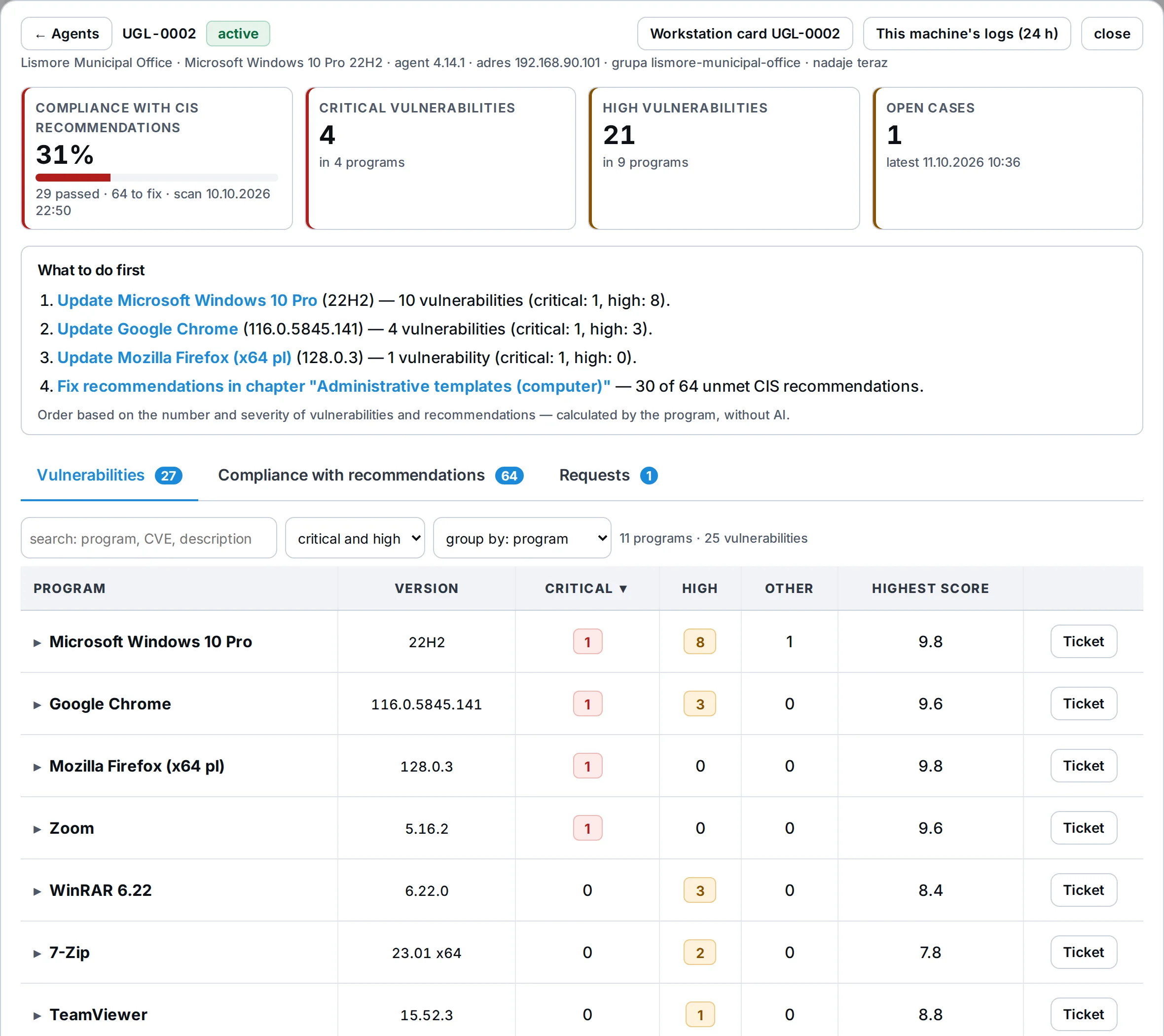
Machine panel UGL-0002: CIS compliance 31%, critical and high vulnerabilities, a What to do first list and vulnerabilities grouped by program with a Ticket button – sample data
Machine card: CIS score, “What to do first” and vulnerabilities grouped by program. One click turns any program into a ticket.
Repeated alerts become one case.A run of failed passwords on one machine is one case with a counter, “4 times”. Each case has a technician, a status and a reason when someone dismisses it.
You set the threshold.From level 7, 10 or 12. Lower levels are the normal life of a system: they stay in logs and reports, with no alarm on your phone.
One sentence with every alert.ANANAS adds what the rule means and what to check. Only the rule description goes to the AI, without the company, machine or logins. For now these explanations are written in Polish.
Alarms for clients with a monitoring contract.Serious Wazuh events come back every 10 minutes on technicians’ screens and phones until someone takes the case. They also land in the event register in the client portal.
CIS compliance and known holes.Every 6 hours ANANAS pulls the CIS score and the CVE list for each machine. You see the weakest computers and failed recommendations with a hint on how to fix them.
Turn a vulnerability into a ticket.“Create ticket” fills in the company and a description, e.g. “update 7-Zip on three computers”. A person saves it.
Search logs from ANANAS.Who tried to sign in and from where, what happened on the machine 10 minutes before and after. Every log search is recorded in the program’s audit log.
Read-only account.ANANAS connects to Wazuh with an account that can’t change anything, keeps passwords outside the database and pins the server certificate on first connection.

Wazuh agents run on computers and servers. Logs stay in Wazuh and ANANAS searches them live. You map a Wazuh group to a company once, and each computer links to its workstation record by name.

Click it yourself instead of reading about it.The demo runs on sample data: monitoring, TV dashboard, tickets. You get access right away.
CYBERSECURITY · NIS2 · INCIDENT RESPONSE

The monitoring and incident handling an NIS2 auditor will ask about.

NIS2 expects someone to watch the infrastructure, respond to incidents and be able to prove it. With ANANAS you do it for your clients as a service, from small businesses to public bodies. You have full control over what happens on their networks, and documentation that builds itself from everyday work.

Detect.Zabbix, ESET, Wazuh and backups flow into ANANAS. Threshold alerts, suspicious sign-ins and account changes from logs, silent backups and a report from every night.
Respond.Every detection and problem is a case with a technician and a status. Scan, isolate a computer from the network or open a ticket in one click.
Document.A security incident register for every client and a change log nobody can wipe. Every response has a date and a name.
Prove.Shift reports, a full trail of who did what and when, and a GDPR Art. 30 record of processing as a PDF.
NEW · CONTRACTED MONITORING
A monitoring contract your client can actually see working.
An alert nobody can miss.When a contracted client’s server goes down, a backup fails, the antivirus can’t deal with a threat or Wazuh sees a serious event, every technician gets a pop-up on top of the screen and a phone notification. Every 10 minutes, until someone clicks “I’m on it”. At night only truly critical things wake you up.
The client sees what they pay for.The client portal has a Monitoring tab: the register of monitored devices with their status, and a log of events and incidents with what you did about them, Wazuh events included. The register builds itself from your records, Zabbix and backups, and the data only opens after a password and an authenticator code.

ANANAS gives you the tools and the documentation. NIS2 compliance also depends on your client’s own procedures and people.

NEW · ONE-TIME PASSWORD LINKS

Send a password to your client with a link that works once.

The technician types the password in a ticket, on the company card or in the password generator, and ANANAS gives a one-time link. The client opens it, sees the password and the content disappears from the server. The technician’s browser does the encryption and the key lives only in the link, so the program’s database holds nothing anyone could read.

your-company.ananas24.pl/h/7Qm2xK#key-only-in-the-link
Only the browser knows the part after the # sign. The server receives encrypted content and never sees the key.
YOU → CLIENT“Send password”The password for a mailbox, Wi-Fi or a new account reaches the client without an email with the password in it.
Read once.Once read, the content disappears from the server and the next attempt shows “already read”. The password appears only after clicking “Show”, so a mail scanner that opens links on its own will not use up the read.
Expiry and a code by phone.The link works for 7 days, 24 hours or 1 hour. Optionally add a 6-digit code you tell the client by phone. Five wrong attempts and the message is destroyed.
Mailem, SMS-em, w JUICE albo sam.The program sends the link, or you copy it and send it through another channel. Then the key never reaches the server at all. One click revokes the link.
CLIENT → YOU“Request credentials”The client types the login, password and server address into a form instead of dictating them by phone or writing them in an email.
Encrypted with a key kept outside the database.The technician reads the data with “Show data”, and every view is logged: who and when.
They delete themselves.After clicking “Configured, delete”, when the ticket is closed or after 14 days.
A trail without the content.On the ticket and the company you see who got what, how and when, whether it was read and until when it is valid. The password itself never appears in the log, exports, search, reports or AI.

For security audits: credentials travel outside email, with a one-time read, automatic deletion and a log trail. ANANAS is not a password manager and does not keep passwords permanently. Your company’s passwords stay in your password manager.
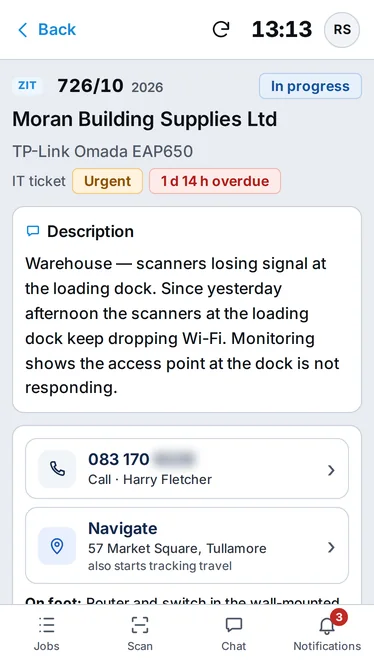
IT ticket card on a phone: description, call and navigate buttons – sample data

With ANANAS, every site visit pays off.

The technician arrives at the client, taps “Quick service”, picks the company and the clock is already running. On site they note what they did and add photos from the phone, and the service report builds itself from that. The client signs it on the phone screen and that's it. Nobody retypes anything in the office in the evening.

Before they even get there, they tap “Navigate”. The map takes them to the address while ANANAS logs the trip: minutes and kilometres. On arrival, one tap on “I'm on site” and the work time starts. Finally you know what a visit really costs you, not just how long the job took. If you want, the program will also tell you when someone's drive takes suspiciously long.

TRAVEL
23 min
DISTANCE
18.4 km
ON-SITE WORK
1 h 10 min

Quick remote sessions don’t slip away either. After an AnyDesk session ANANAS opens a ticket by itself with the client, computer, technician and time worked, and the technician adds one sentence on what they did. Several sessions with the same client merge into one case.

Every hour goes straight to billing at that client's rate, separately for on-site, remote and workshop work. No more visits that went unbilled because nobody felt like filling in the paperwork ;)

Which cable goes to accounting? Check it in ANANAS.

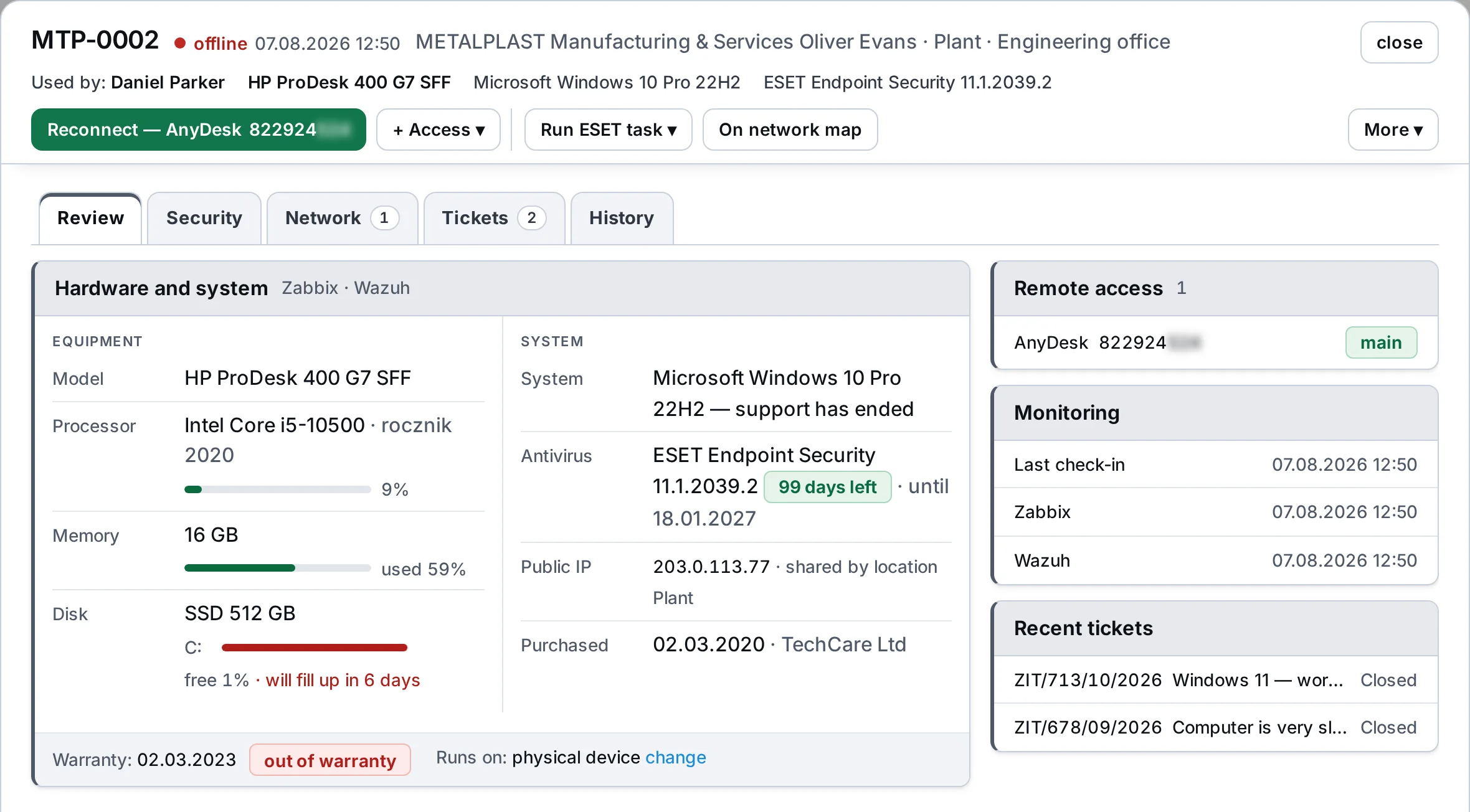
Type the number from the sticker on the computer and you have everything: specs, OS, antivirus, IP address, who sits at it and whether it's online right now. From the same card you connect to the person reporting the problem in one click, via AnyDesk, TeamViewer or RDP. No digging for IDs in your notes, no jumping between programs mid-job.

Switches, routers, printers, cameras, UPS units and racks get their own cards too, with ports, VLANs, PoE and what they're plugged into. From that data ANANAS draws the first version of the client's network map. The map shows IP addresses and which device responds, and names and addresses come straight from the inventory, so the drawing won't drift away from reality in six months. Click a device to open its card, and print the whole map on a single page.

And the documentation a NIS2 auditor will ask for builds up as a side effect of everyday work.
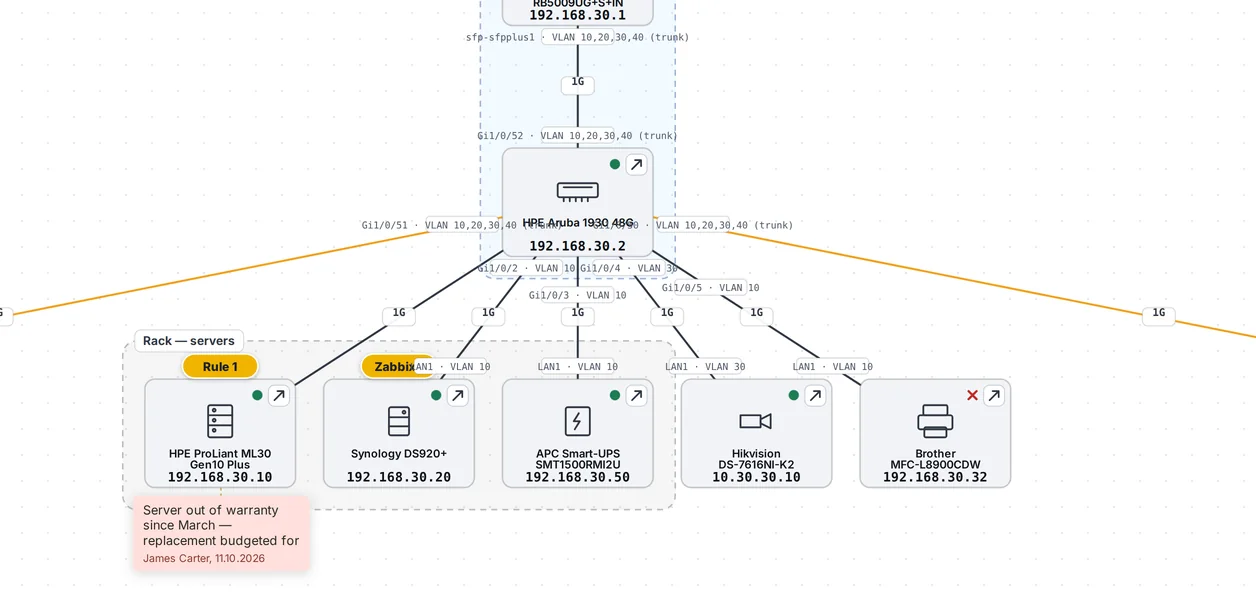
Network map in ANANAS: switch, ports and VLANs, devices in the server rack zone with a sticky note and event badges – sample data
Part of a map: which port goes where, link speed, IP address and who's offline right now. In front, a workstation preview from the map with the AnyDesk button.
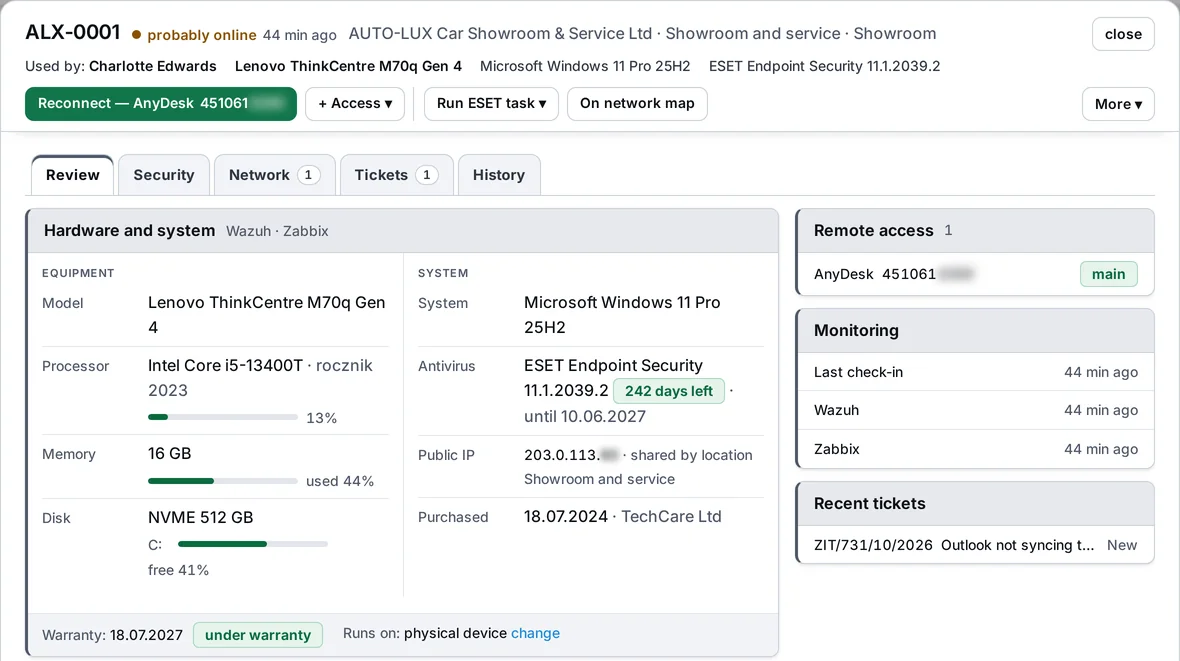
Workstation card ALX-0001: who uses it, model, processor, memory and disk load, system, antivirus, warranty and monitoring – sample data
EVENTS ON THE MAP

The map shows where things are on fire.

Above each device hang badges with the number of open events from ESET, Zabbix, Wazuh and the program's own rules. The colour tells you how bad it is. Click a badge and open a ticket straight from the event list.

A company with branches gets a locations map with sites linked by fibre, VPN or radio link. Sticky notes hang next to the device they are about, and “On network map” on the ticket card shows that device on the drawing.
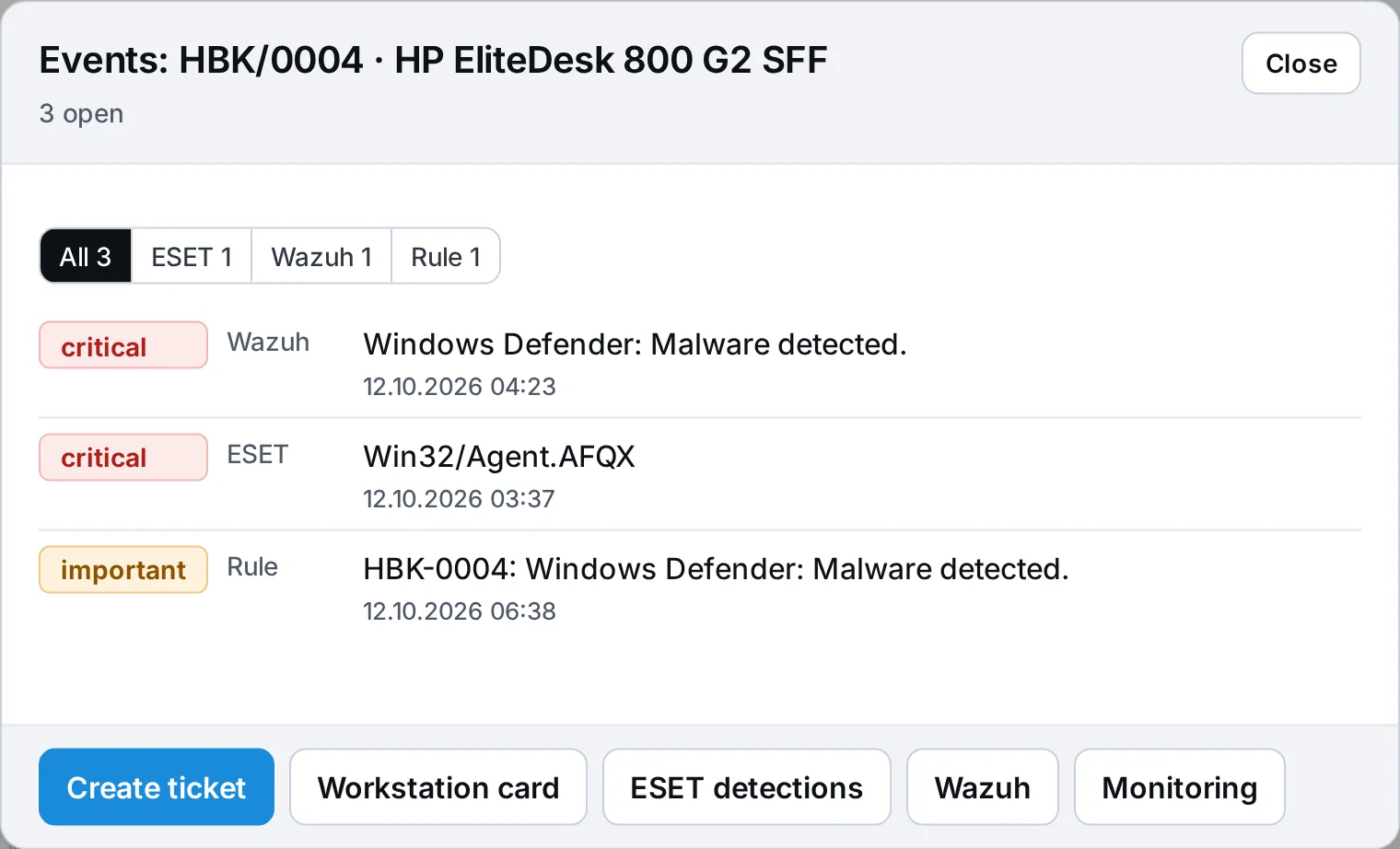
Events window for computer HBK/0004 on the network map: three open events from Wazuh, ESET and a rule rated critical or important, plus Create ticket, Workstation card, ESET detections, Wazuh and Monitoring buttons – sample data
HARDWARE RECORDS

Records that don't get overgrown.

The program finds entries no monitoring has ever seen, computers that have been silent for a long time and duplicated workstations. You retire them with one click, and if one turns out to be alive, it comes back on its own when ESET, Zabbix, Wazuh or AnyDesk sees it again. Nothing gets deleted.

Data from ESET, Zabbix, Wazuh and AnyDesk add up to one computer card, and the technician's manual decision beats the automation.
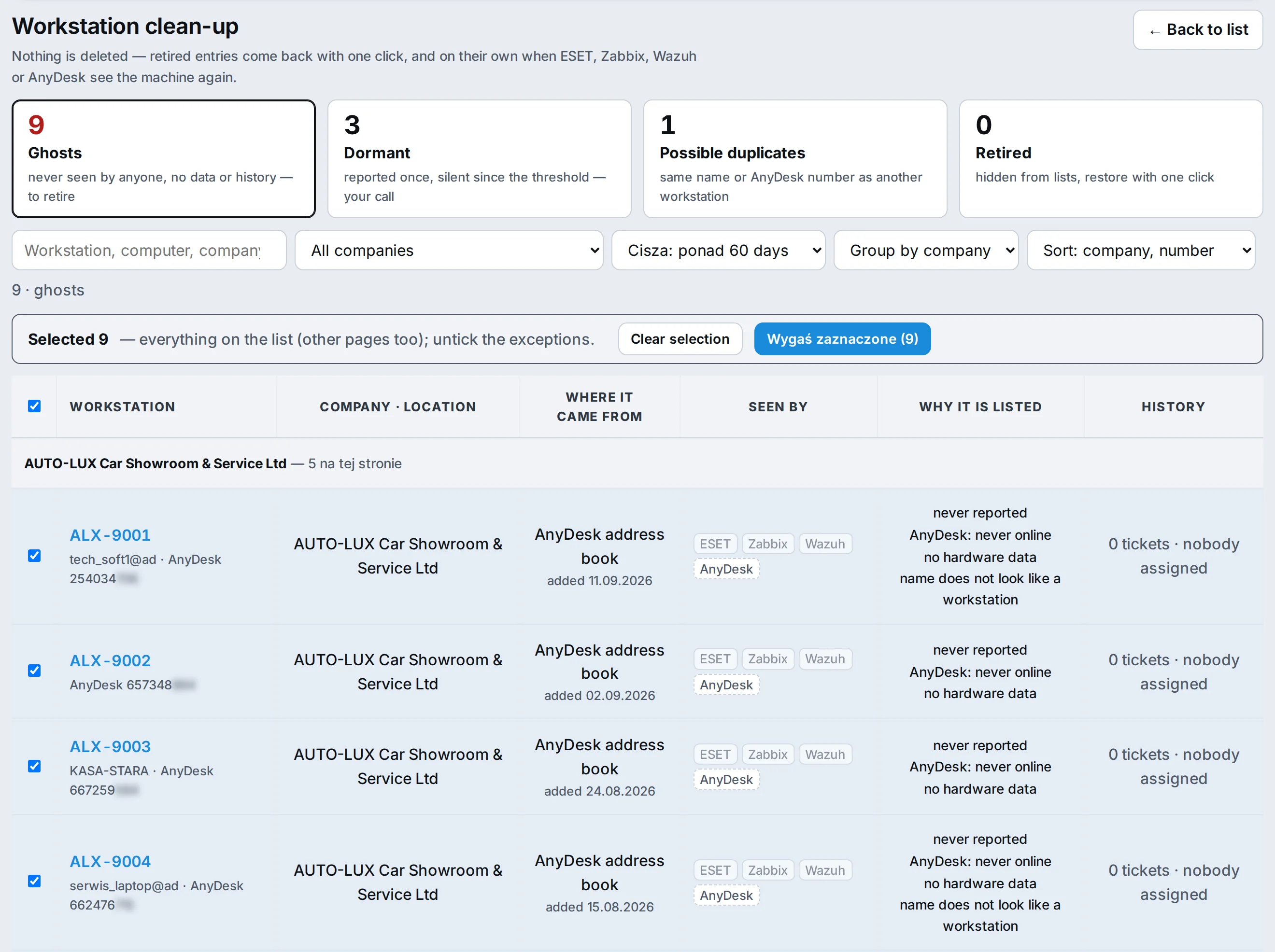
Workstation clean-up: Ghosts tab with “Seen by” and “Why it is listed” columns – sample data
Clean-up: every entry shows which source saw it and why it's on the list.
Workstation card: header with status and AnyDesk, plus the “Hardware and system” block with Zabbix load bars and a disk-full forecast – sample data
Workstation card: Zabbix load next to the CPU, memory and disk, and “full in 6 days” next to the disk.
Ghosts, sleepers and duplicates.You choose the silence threshold from 30 to 365 days. Merging duplicates moves the history onto one entry.
Seen by.Each source separately, with the date of its last check-in.
JUICE: client portal

Even Linda from accounting will manage.

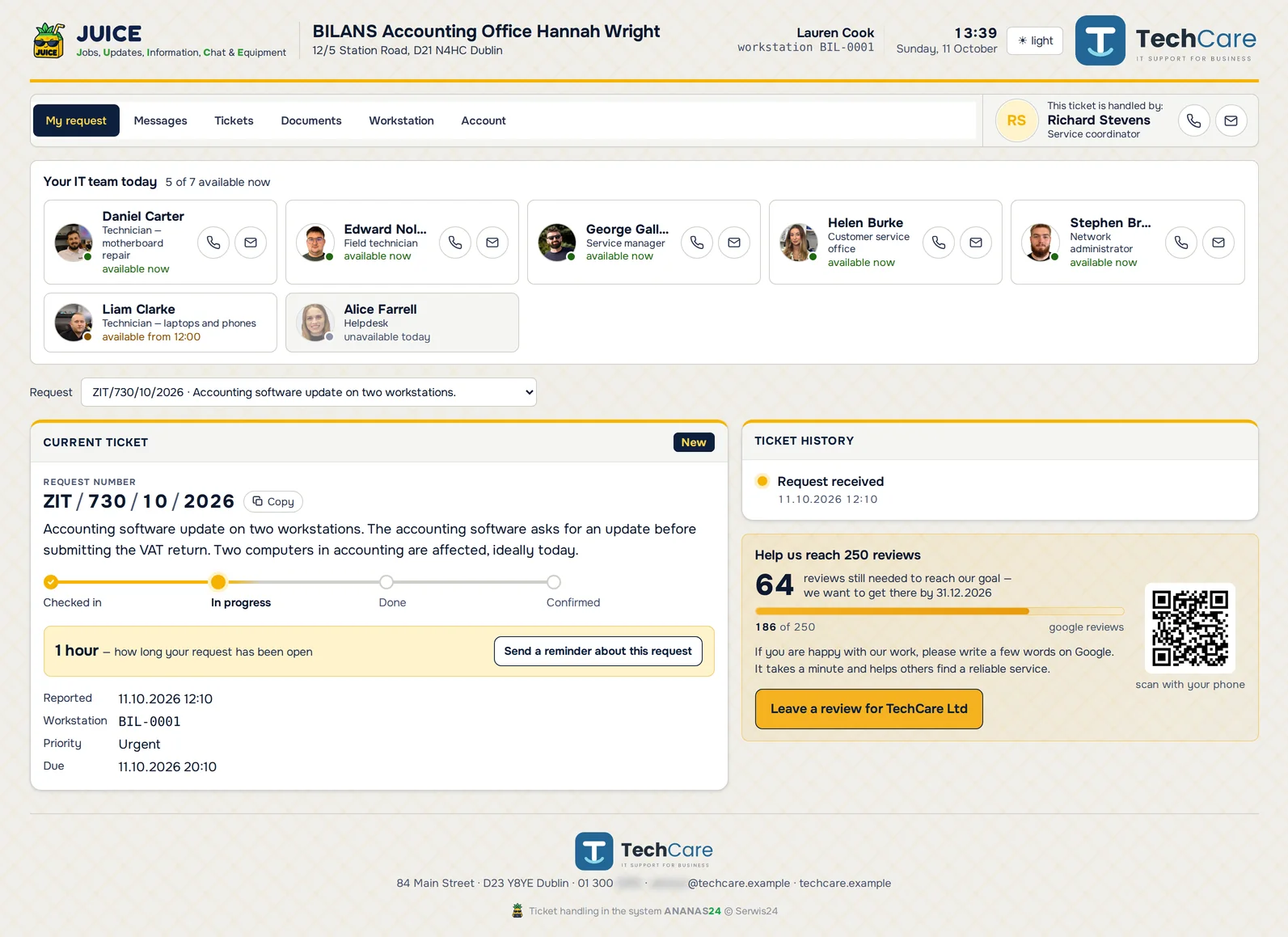
Every employee of your client gets a personal permanent link, or a QR code to stick on the monitor. No account to create, no password to remember: they click and report the problem. They see who's handling it, can message the technician and attach a screenshot. Before they submit, they get tips from your own guides, so some “my printer won't print” cases get solved without you.

After the job, the service report goes to the client, who confirms it in one click. The decision-maker on the client's side sees the numbers: how many tickets there were and what was done. When the contract comes up for renewal, you talk about facts, not about whether you do anything at all.
JUICE · client employee portal
JUICE portal on a computer: the employee's current ticket with progress, the IT team available today and the Google reviews goal – sample data
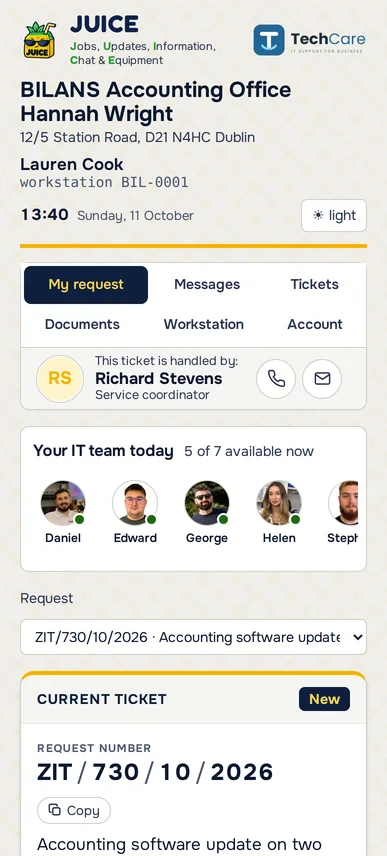
JUICE portal on a phone – sample data
GOOGLE REVIEWS

Happy clients don't leave reviews. Unless you remind them.

You know the drill. You do a solid job, the client says thanks, and that's it. Out of a hundred happy people, maybe one goes to Google and writes something. But let one thing go wrong once, and a review shows up that same day, and probably not just one.

That's why ANANAS reminds them for you. Your clients' staff see a QR code to your Google Business profile in JUICE, along with a counter of how many reviews you still need to hit your goal. The strongest nudge comes right after they confirm a service report, the moment they've just seen the job is done. The counter checks your review count in Google by itself, and you set the goal and the deadline.
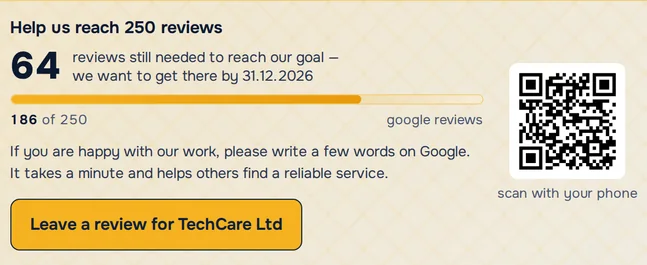
Google reviews tile in JUICE: counter of reviews left to reach the goal, progress bar, QR code and Leave a review button – sample data
See what your client sees.In the demo call we'll also walk through JUICE, the portal your clients' employees use.
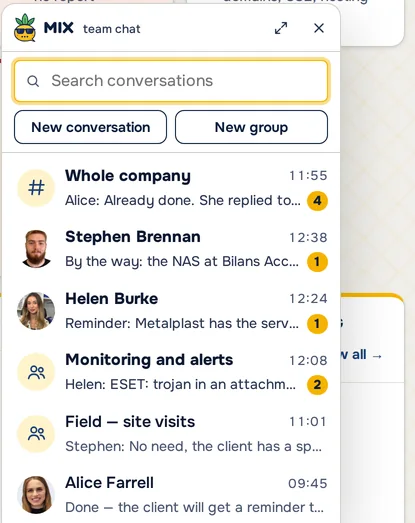
MIX team chat: the whole-company channel, groups such as Monitoring and alerts or Field – site visits, and private chats – sample data
MIX: team chat

Team decisions don't get lost in WhatsApp any more.

MIX is the chat inside ANANAS for the whole crew: a company channel, a channel for every branch, groups and private conversations. The technician in the field asks, the office answers, and it all happens in the same program you already work in. Drop in photos and files, add a GIF, tag someone with @ and they see it right away.

The history stays in the company, not on your employees' private phones. Anyone who's not part of a conversation can't see its messages or files.

TEAM AND CALENDAR

Know who's heading to a client today before anyone asks.

Right above the ticket list you see who's free now, who's at a client until 12:00 and who's on leave. You give the ticket to someone who can actually take it today.

The week view shows everyone's plan: working hours, leave, business trips and training. Below it: client visits, scheduled maintenance, ticket deadlines and meetings. You can add several people to one event, Google Calendar entries come in on their own, and you can subscribe to the calendar on your phone.

Today at the service point bar above the ticket list: who is available and until when, who is on leave, open and overdue tickets and pineapples – sample data
Weekly calendar in ANANAS: availability of every employee, leave and leave requests, training, client visits and ticket deadlines – sample data
NEW · NOTIFICATIONS

Everyone chooses what lands in their bell.

In the company settings you choose which kinds of notifications are created at all, with how many there were in the last 30 days. For new tickets you can keep only those reported by the client: from the portal, the form or email. Each employee can also mute what they don’t need.

Switched off means never created.A switched-off kind takes no space in the bell, the counter or the phone.
Everyone sets their own.“What to show in the bell” in the bell or “My notifications” in the account menu. It covers phone notifications too, and the rest of the team keeps getting them.
Clean-up with one button.Mark old unread notifications as read for everyone at once.
NEW · SLICES AND PINEAPPLES

We built an RPG quest your whole team plays at work. Perfectly legal, and it pays off for you.

Technicians collect slices for what they should be doing in the program anyway: time entries with a description, specific notes, messages to the client, tickets closed on time. 10 slices make one pineapple. Whoever collects the most pineapples in a month becomes the Pineapple King and wears a crown next to their name in the program.

You get well-described tickets, reports clients don’t argue with, and billable time without asking “so what exactly did you do there”.
Reports and invoices built from facts.A slice for a time entry with at least 20 characters of description. The program builds the report and the bill from those entries.
The client knows what is going on.A message to the client earns a slice, so the client hears from you before calling to ask.
Deadlines are met and old tickets get closed.+2 for a ticket done on time, +3 for closing a case open for more than 14 days. A reopened ticket takes away 3 slices.
Clicking around won’t farm slices.A note needs at least 40 characters, and notes in one ticket earn a slice once a day.
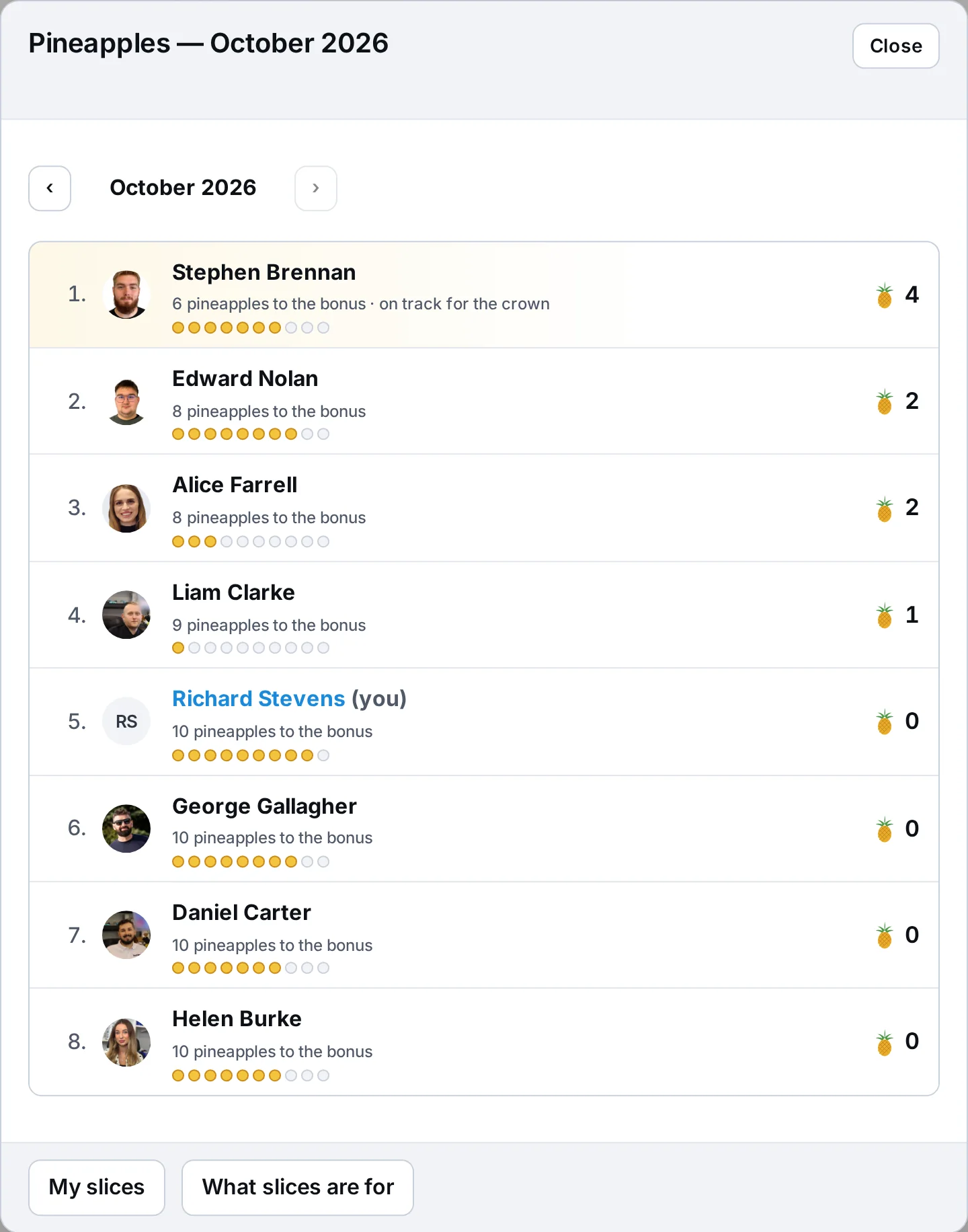
One leaderboard for the whole company.IT technicians, the repair shop and the front desk play together. The leaderboard also shows how many pineapples are missing to the bonus threshold you set.
Pineapples leaderboard for October 2026 in the IT Panel: technicians with their pineapples, slices towards the next one and how many are missing to the bonus – sample data
Open the leaderboard from “Today at the service point”. For everyone: pineapples, slices towards the next one and what is missing to the bonus.

What slices are for in the IT Panel

Time entry with descriptionIn a ticket, at least 20 characters. Once per ticket per day.
+1
Note on a jobAt least 40 characters. Once per ticket per day.
+1
Message to the clientA note visible to the client or a message in the conversation.
+1
Well-described ticketProblem description of at least 20 characters.
+1
Photos on a jobFrom a computer or by phone from the QR code.
+1
Done before the deadlineTicket closed on or before the deadline.
+2
Old case closedA job finished after more than 14 days.
+3
Cash register balancedCash matching to the cent when closing the day.
+2
ReopenedA closed ticket came back to work.
−3

The rules are built into the program and the same for everyone. In “My slices” everyone sees when and why they got a point. The program counts, and you decide how to reward the king.

You look at it all day, so pick how it looks.

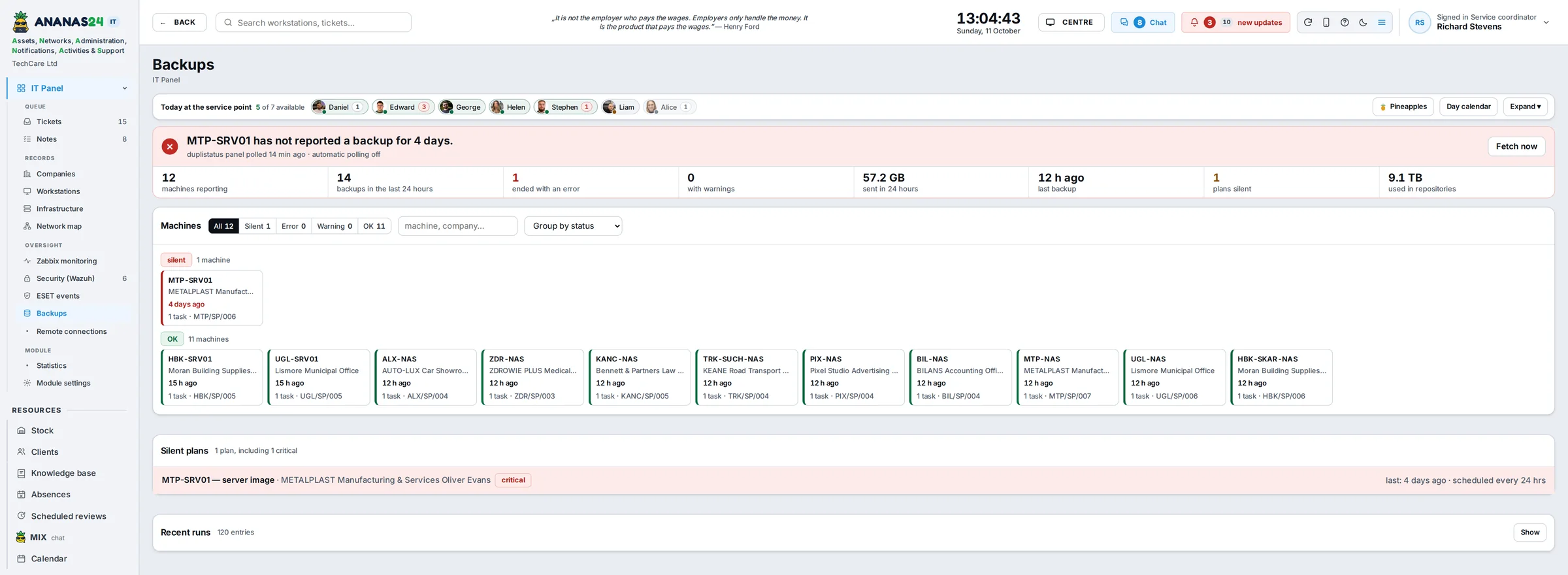
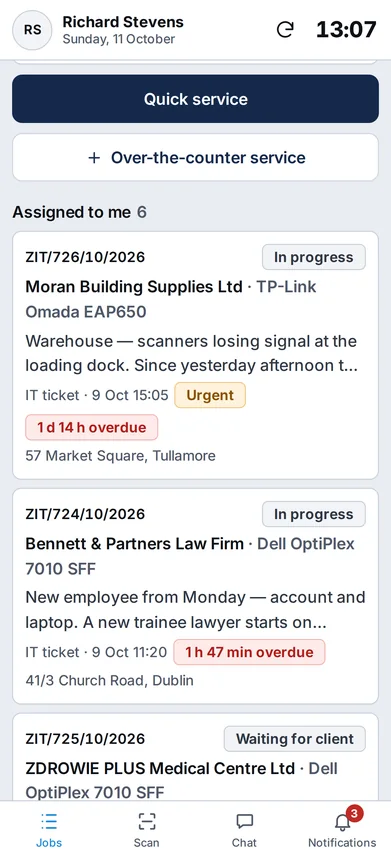
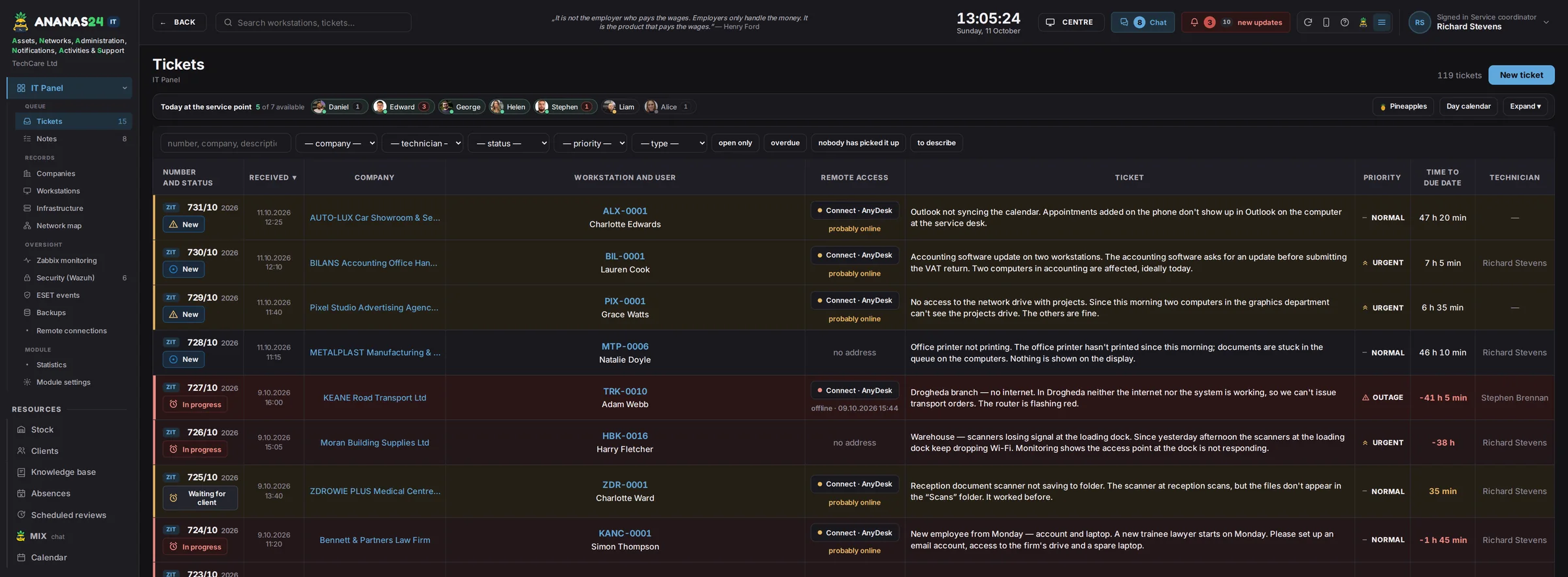
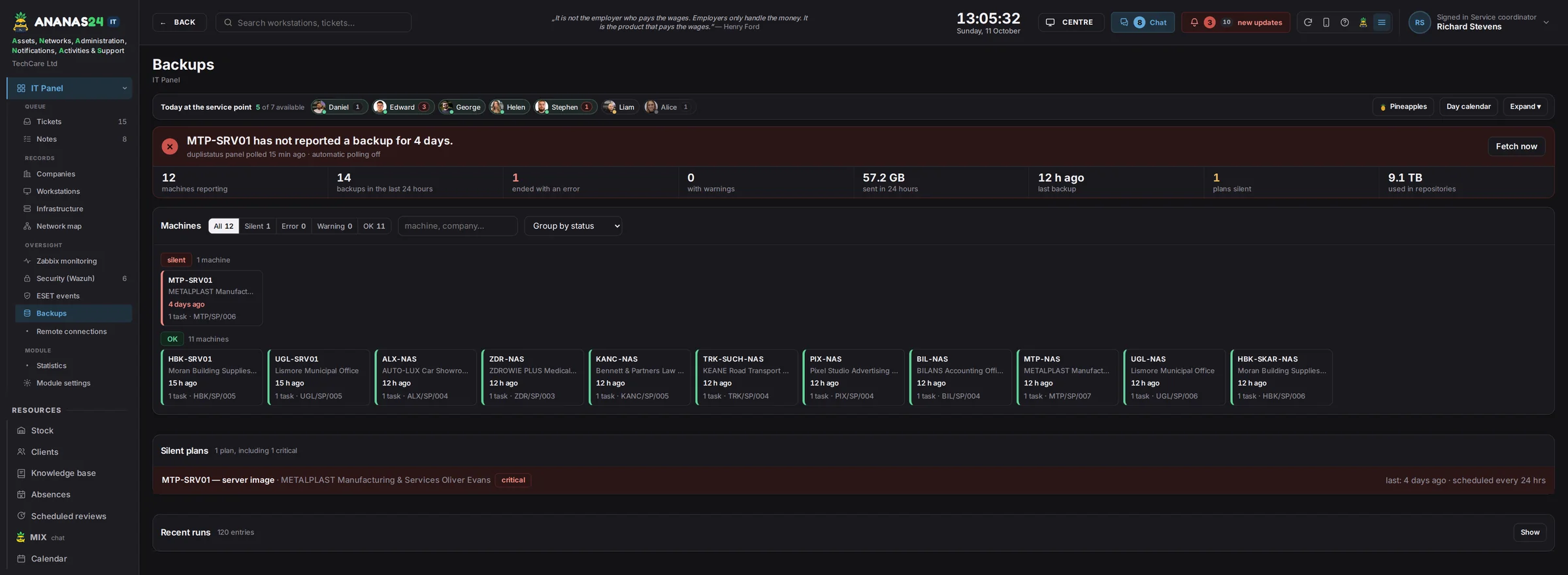
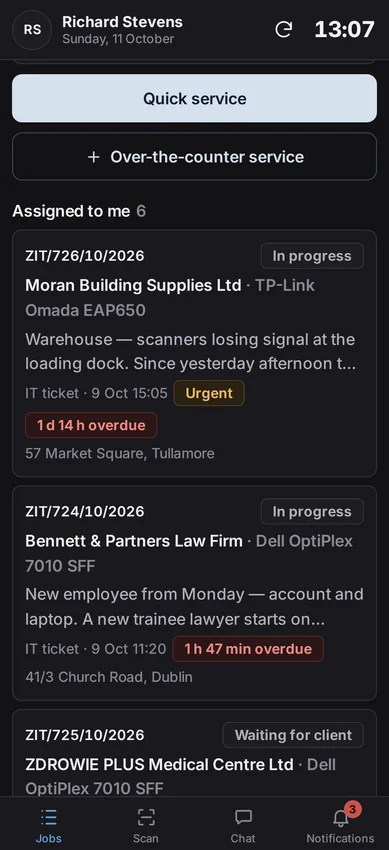
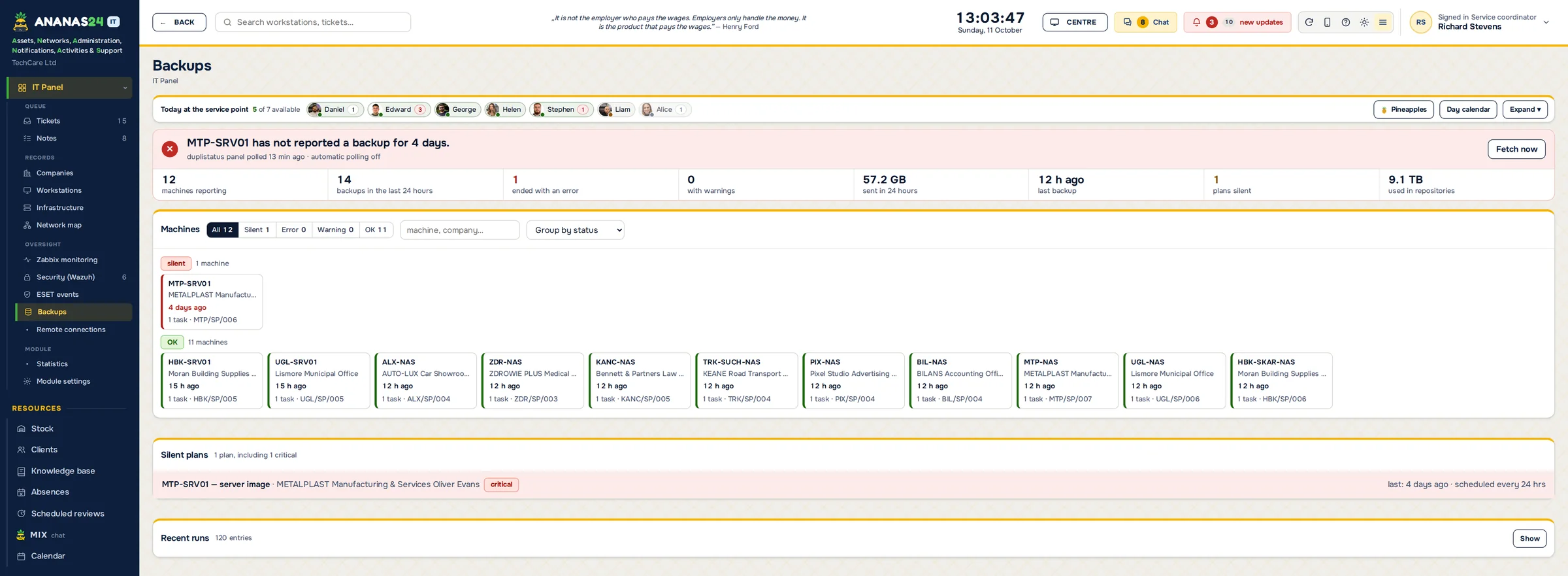
ANANAS has three themes, and you switch between them with one click in the header. Alerts and statuses are equally easy to spot in each. Themes work on the phone too. The screenshots show the same screens in every theme: the ticket list, client backups and a technician's job list on the phone.
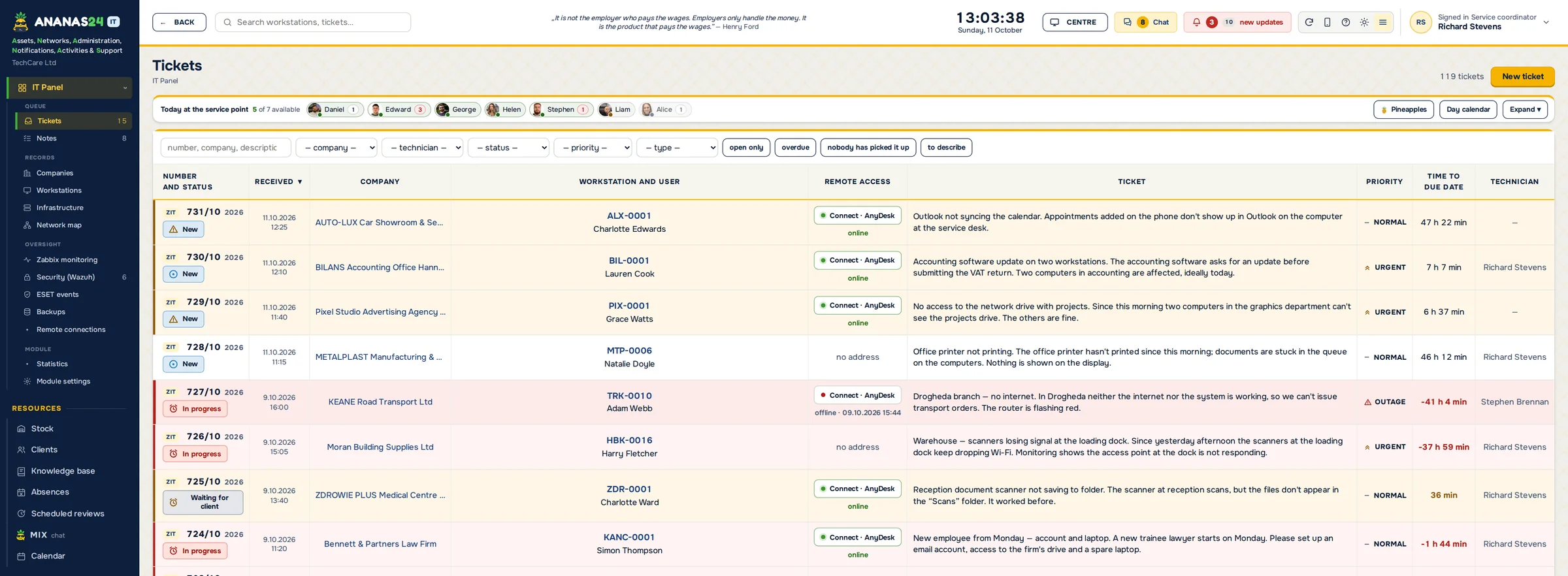
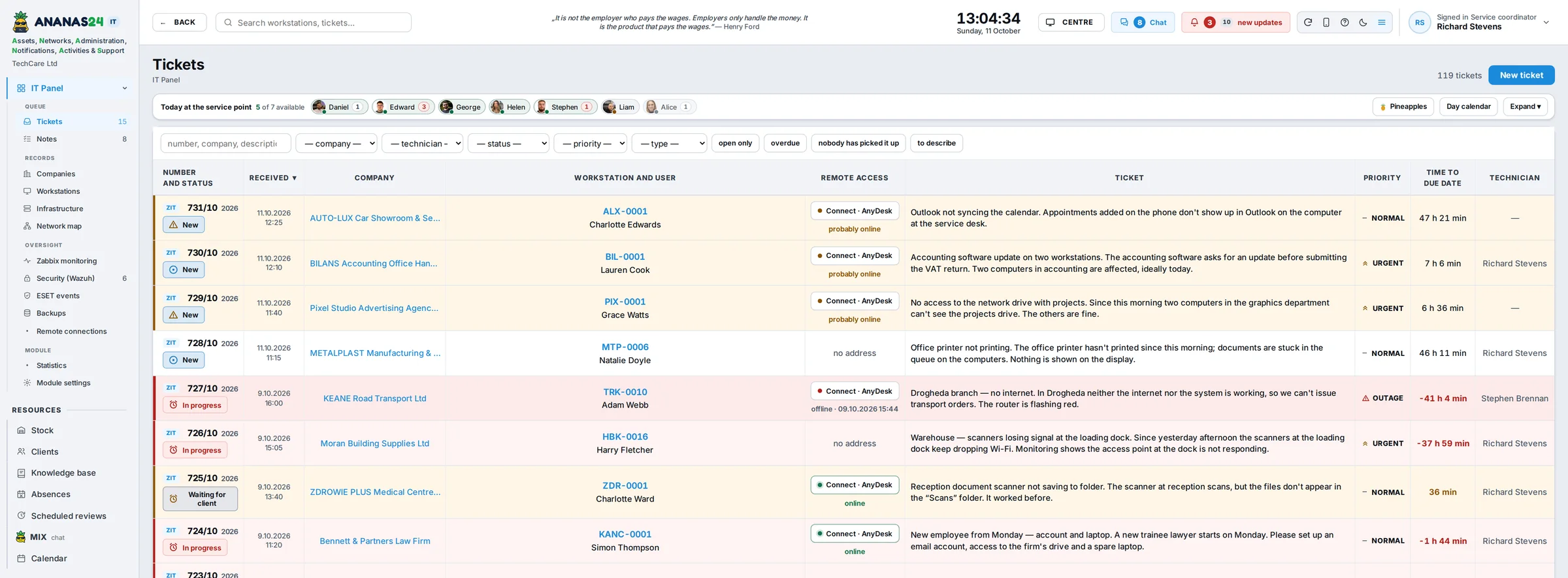
IT ticket list in the ANANAS theme – sample data
Backups screen in the ANANAS theme – sample data
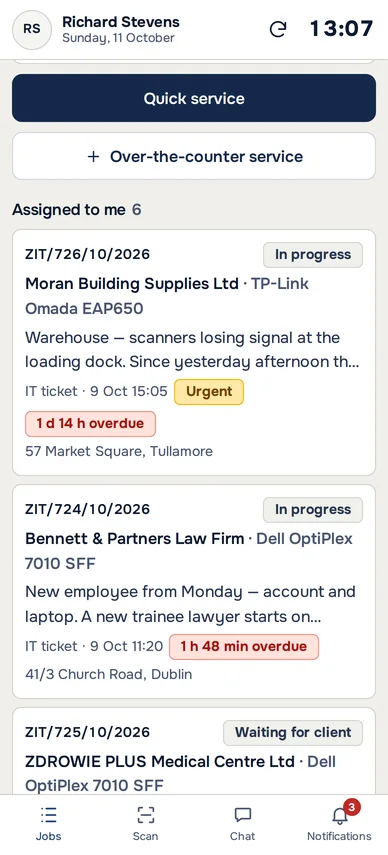
Technician's job list on a phone in the ANANAS theme – sample data
ANANASNavy and yellow, our house colours.
IT ticket list in the light theme – sample data
Backups screen in the light theme – sample data
Technician's job list on a phone in the light theme – sample data
LightCalm, office-friendly.
IT ticket list in the dark theme – sample data
Backups screen in the dark theme – sample data
Technician's job list on a phone in the dark theme – sample data
DarkFor evenings and on-call shifts.
Read enough? Pick a plan.From €59 net a month, cancel any time. Not yet? Keep reading to see what ANANAS does for you with quotes and paperwork.
PACT logo: a pineapple in sunglasses with a document folder
PACT · QUOTES, OFFERS, OPINIONS

Your quote for three laptops is ready before the client asks for a discount.

(and before they've had time to Google your competitors)

Tired of spending hours on client quotes? So were we, which is why we built PACT. Quotes, offers, service reports and technical opinions take minutes. You type in the model, and AI adds a description and specs checked online, and drafts the option summaries and quote notes. You can plug in any language model, including one running on your own server. Want to give the client a choice? Add two, three or four options, say three different computers. Mark one as recommended, and shared items such as installation or data transfer are added to every option.

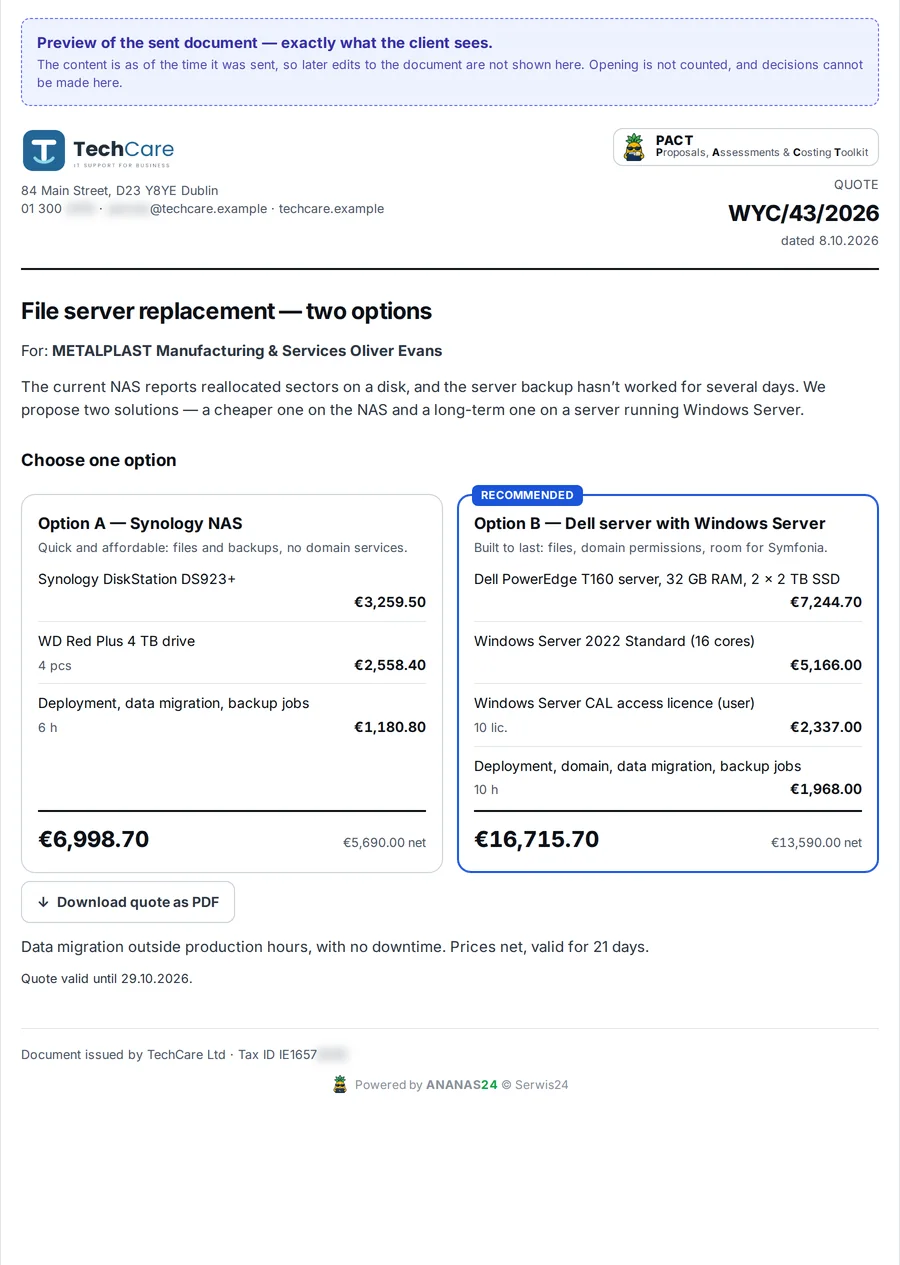
The client doesn't get a PDF that disappears in their inbox, but a link to a clear page with the offer. They compare the options, pick one, and accept it or reject it with a comment. A sent quote never changes, so there's no arguing about what the first version said. A technical opinion, for example for equipment disposal or an insurer, is drafted by AI from the job data, and you just check it and sign.
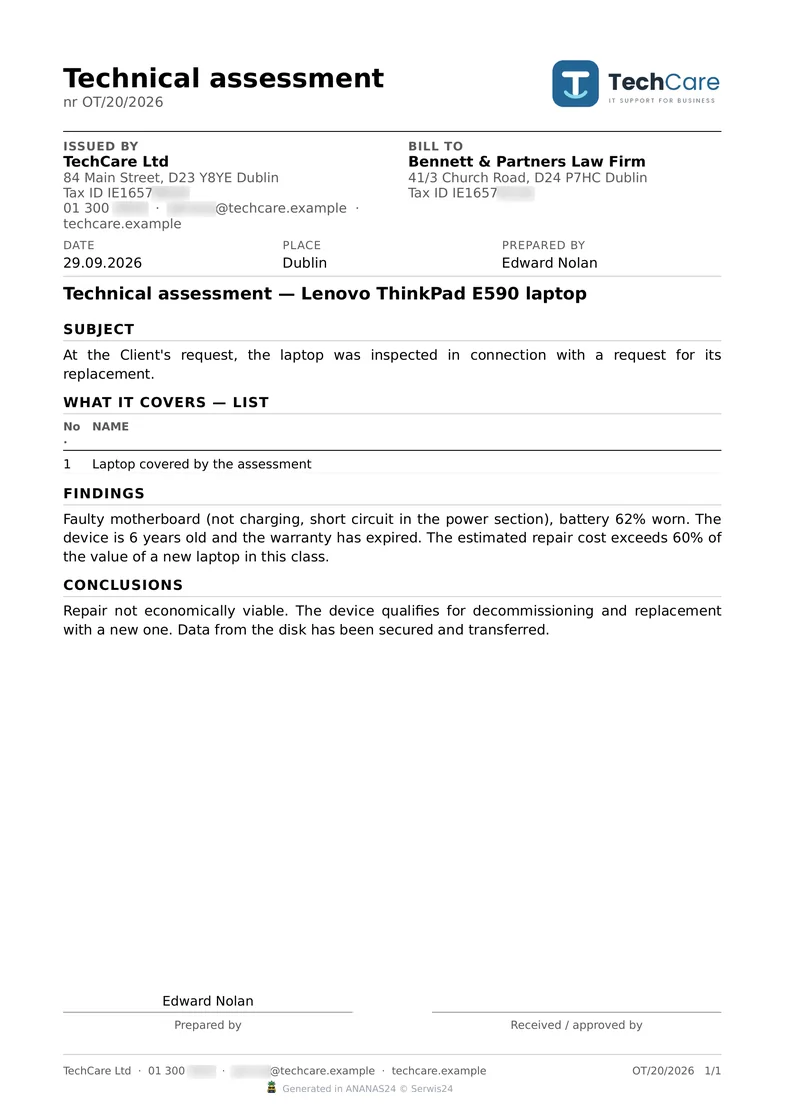
Technical assessment from PACT: a laptop not worth repairing, with findings and conclusions – sample data
The client wanted a new laptop. The technician checked the old one, and the assessment for the client, with findings, conclusions and a signature line, was ready in a few minutes.
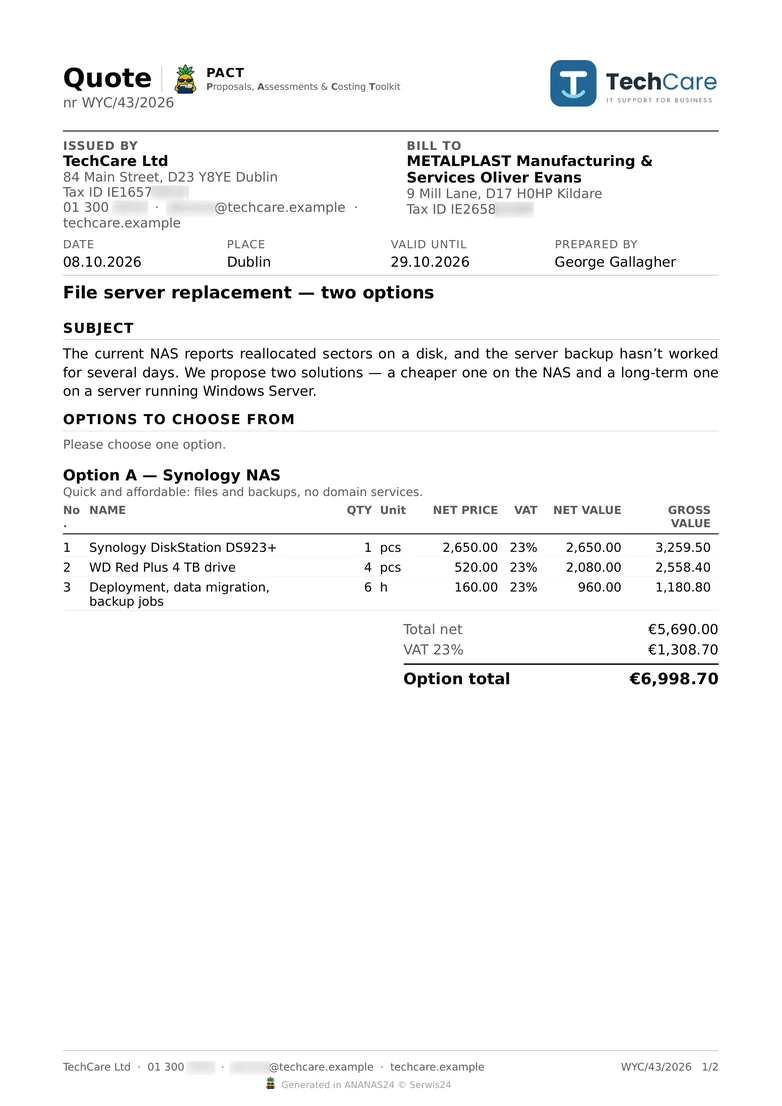
PACT quote as a PDF: header with logo, description and option A with a line-item table, VAT and total (option B on the second page) – sample data
PACT quote as the client sees it at the link: option A and recommended option B side by side – sample data
In front: what the client sees at the link. Behind it: the PDF of the same quote, for anyone who still prefers paper.
PACT · CONTRACTS AND GDPR

Your client contract comes out of ANANAS too.

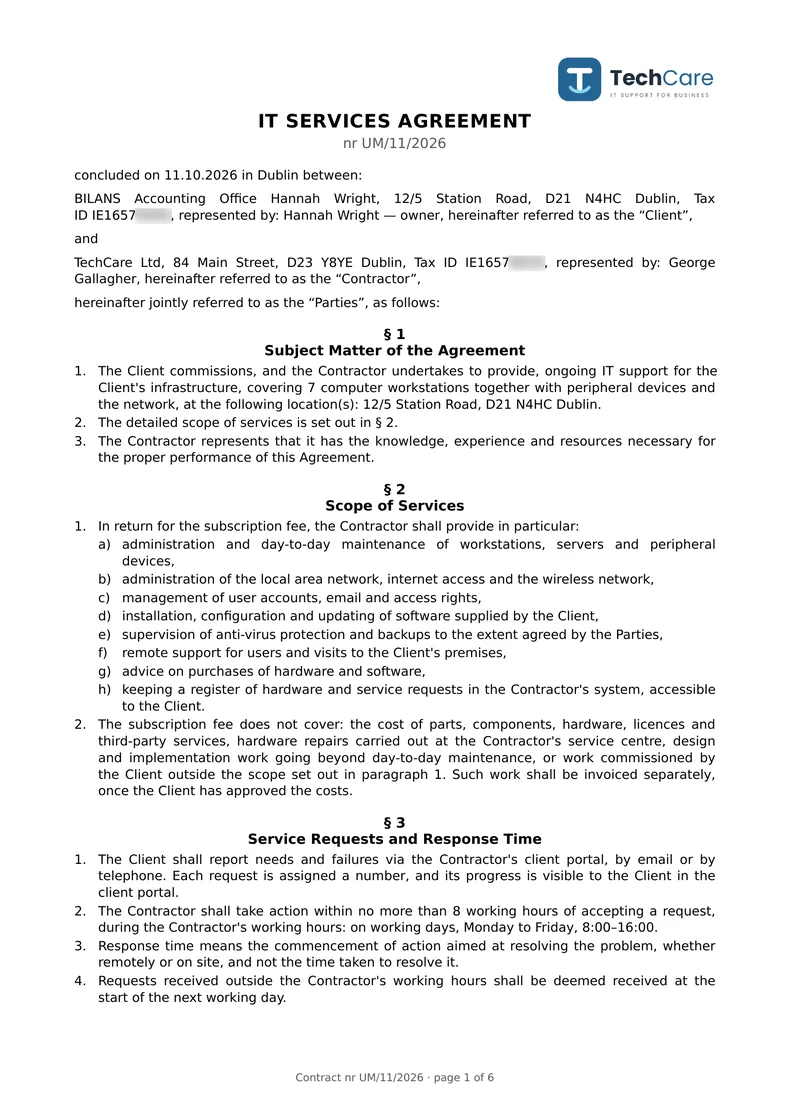
Company details, workstations, locations and the list of systems you have access to are already on the client card. The contract pulls them from there, so you don't retype anything from an old Word file. You choose the document type: an IT support agreement, an infrastructure monitoring agreement, or a standalone data processing agreement for clients whose main contract you signed years ago.

You type the subscription fee, response time and notice period into fields, and the program places them in the text. Anything you haven't agreed yet prints as a dotted line to fill in by hand. Once signed, the contract goes into the client's records in one click. You also get a GDPR Article 30 record of processing activities for all clients at once, or an extract for one company, ready for an auditor. All the paperwork of IT support lives in one program.

The built-in templates follow Polish law and are a starting point, not legal advice. Review them once with your lawyer, or save your own template and reuse it.
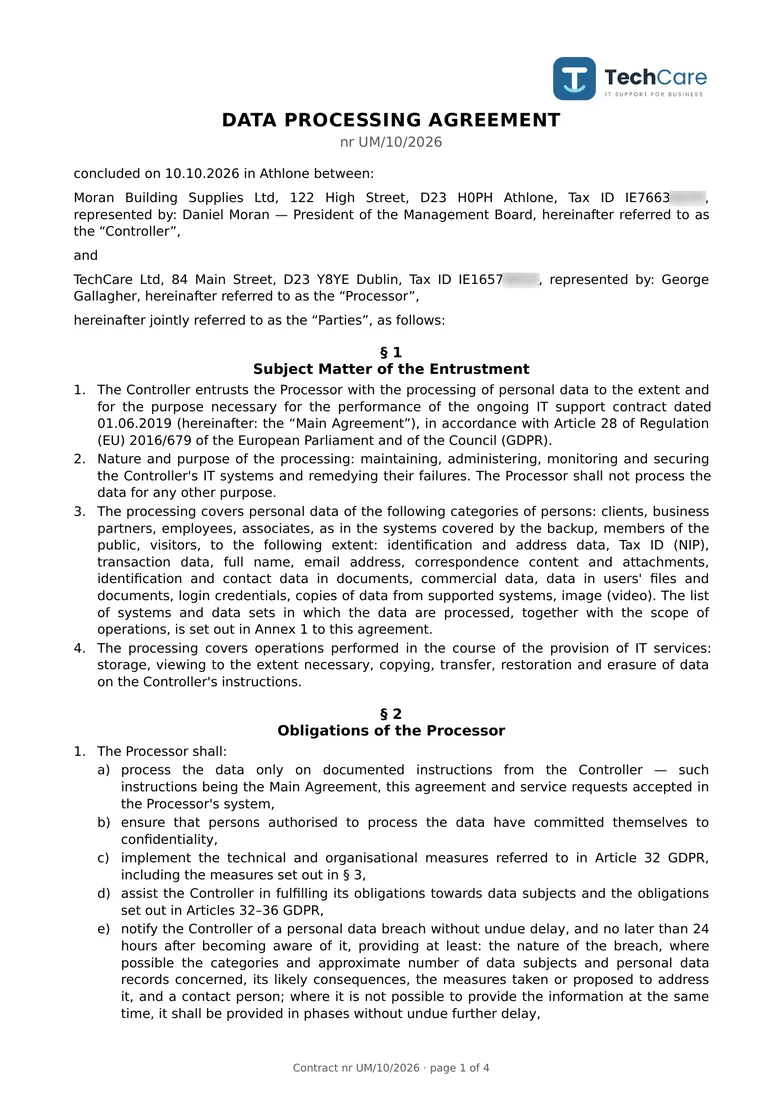
Data processing agreement generated in ANANAS, page 1 – sample data
IT support agreement generated in ANANAS, page 1 – sample data
An IT support agreement and a data processing agreement, straight from the program. Your logo and company details fill in by themselves.
INVOICING · FAKTUROWNIA AND SUBIEKT GT

Subscription and ticket invoices, issued from ANANAS.

Every month the program collects the subscription fees from all contracts: company, contract number, net and gross amount. Select them, click “Issue selected” and the invoices are created in Fakturownia or Subiekt GT (InsERT GT), the Polish accounting systems ANANAS works with. Using different software? Tell us which one – we can connect it. Paid tickets outside the subscription wait on the “To invoice” list until someone invoices them.
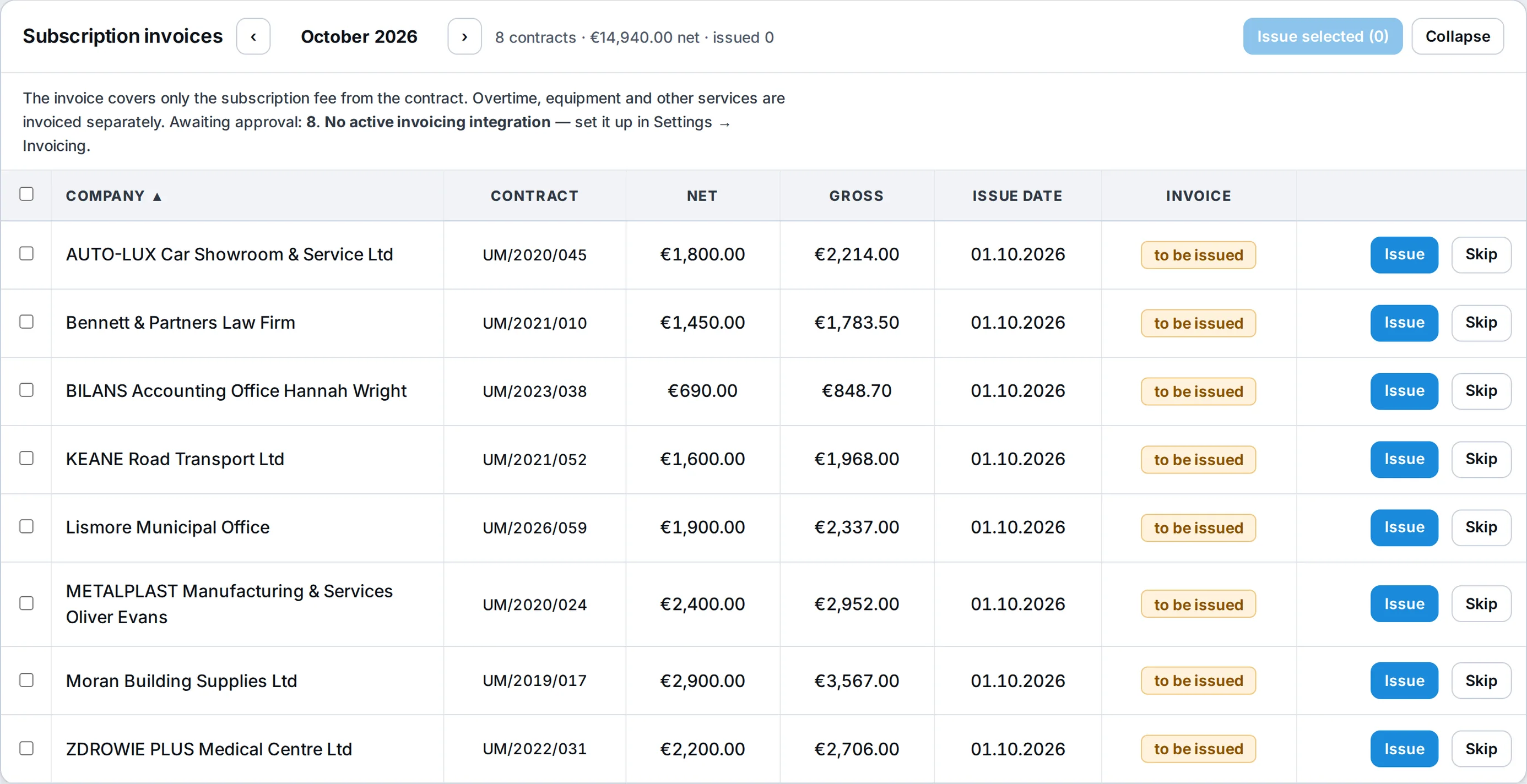
Subscription invoices, October 2026: eight contracts with net and gross amounts, issue date, to-be-issued status and Issue and Skip buttons – sample data
Subscription invoices: the whole month on one list. Issue the selected ones or one at a time, and skip a company that gets no invoice this month.
The subscription on its own invoice.The subscription invoice carries only the amount from the contract. Overtime, equipment and other services go on a separate invoice.
Tickets waiting for an invoice.Closed, paid tickets without an invoice, with the number of days waiting. After 30 days they turn red. Several tickets of one company go on one invoice.
One job, one document.The program makes sure an invoice is never issued twice. If the accounting system returns an error, you see its exact wording.
The invoice number comes back to ANANAS.The invoice is created in the accounting system, so your bookkeeping works as before. The program stores the invoice number (and the Polish KSeF number) with the job.
Subiekt GT through an agent on the accounting PC.A small ANANAS agent on the PC with Subiekt issues invoices and credit notes through Sfera. Fakturownia connects with an API token in the settings.
One line or the full list.One “Service” line on the invoice or the lines exactly as in the settlement, with a payment due date.
AI IN ANANAS

AI writes the paperwork. You just check it and click.

Plug in whichever model you like: Claude, any model via OpenRouter, or your own model running on your server through Ollama or LM Studio. Every feature is switched on separately, and each one can use a different model, for example a stronger one for quotes and a cheaper one for alerts.

AI never sends anything on its own. It suggests, you approve. Clients' personal data is stripped out before anything goes to a model outside your company, and every request is logged, with a daily limit.

Offers in PACTA product description from just the model name, with specs checked online, plus option summaries and quote notes.
Service reportsA summary of what the technician did, written so the client understands it.
Technical opinionsA draft opinion from the job data, for example for equipment disposal or an insurer.
Messages to clientsA draft reply you drop into the conversation in one click.
Alerts in one sentenceESET detections, Zabbix problems and Wazuh alerts explained in one sentence.
Hints on the ticketA suggested fix based on the fault description and the equipment's history.
See what AI writes for you.Book a demo call and we'll build a PACT quote with AI descriptions right in front of you.

All your systems in one ANANAS.

ANANAS doesn’t make you switch tools. Connect ESET, Zabbix, Wazuh, AnyDesk and Duplicati backups, and the program pulls in computers, alerts, log events and backup results by itself. Invoices go to Fakturownia or Subiekt GT and text messages through SMSAPI or SerwerSMS (Polish services; tell us if you use different ones – we can connect them), and Google Calendar events show up in the program’s calendar. Client emails can turn into tickets on their own, and important alerts can go to Teams.

Plug in any AI you like: Claude, models via OpenRouter, or your own model on your own server. In that last case, no client data leaves your company.

WORKS NOW
ESET PROTECT Zabbix Wazuh AnyDesk TeamViewer RDP / SSH Duplicati Fakturownia (PL) Subiekt GT (PL) SMSAPI (PL) SerwerSMS (PL) Google Calendar Google reviews Microsoft Teams Claude Ollama
COMING SOON
wFirma (PL)
Emails and Teams via n8n, we'll help you connect them.

A security tool that isn't full of holes itself.

ANANAS knows a lot about your clients, so we built it with security in mind from day one. Everything below is included in every plan, not reserved for a pricier tier.

The program can run on your server or ours, and every company's data is kept separately. Your data is yours: if you ever leave, you get a full copy of it.

NEW · SECURITY KEY LOGIN

Password, a tap on the key, and you're in.

Works with YubiKey, Windows Hello and your phone.

phishing-resistant several keys per person backup codes

Two-factor login (2FA)

On top of the password, a code from an authenticator app or a hardware key, plus backup codes for a rainy day. App codes also work for clients in JUICE.

Password guessing won't get through

Anyone trying to guess gets blocked by IP address. And a spiteful colleague can't lock you out by typing the wrong password.

A lost phone is no drama

The list of signed-in devices shows every phone and computer. Sign out a lost one in one click from another.

Passwords outside the database

Mail passwords and integration keys are stored separately, encrypted. A database copy doesn't take a single password with it.

Every change leaves a trail

Who changed what, when and why, together with what was there before. Entries can't be deleted from the program.

AI on your terms

You can use a model running on your own server, and then nothing leaves the company. Personal data is stripped out before anything goes to an external AI.

It costs less than the site visits you're losing today.

You only pay for the number of technicians. Companies, workstations, clients in the portal and integrations are unlimited. Every plan has every feature, the only difference is team size.

Green

up to 2 technicians
€59/ month, excl. VAT
Save with yearly: €47.20 / month (−20%)

Ripe

up to 5 technicians
€109/ month, excl. VAT
Save with yearly: €87.20 / month (−20%)

Gold

up to 15 technicians
€199/ month, excl. VAT
Save with yearly: €159.20 / month (−20%)
14 days free, on your own data.You fill in a short request and confirm it with the link in your email. We switch the trial on within one business day: the full program for two weeks with sample data, login details by email. Six “First steps” on the home screen walk you through the settings, and one button removes the samples. 3 days before the end we remind you about payment. After the trial the program switches to read-only and your data stays: pay and keep working.
Call: +48 780 014 330

You pay by card through Stripe, in euros or US dollars, and the subscription renews automatically. EU businesses with a valid VAT ID pay no VAT (reverse charge). Prefer a bank transfer against an invoice? Write to us. You get access to ANANAS24 within one business day.

Bigger team? Write to us, we'll work it out.

Included: help with setup, moving your data from your previous program, and support from people who use ANANAS every day themselves.

No time to set it up? We'll do it for you.

We come over or connect remotely and set ANANAS up for your company: your systems, your procedures, your people. If you don’t have Zabbix, Wazuh or ESET PROTECT yet, we’ll install and connect them. If you want automation, we’ll set up n8n, and if AI must run without sending data outside, we’ll put a model on your own server. You get a working tool and team training, not a manual to read.

Custom setup
from €690
excl. VAT, one-off. Quoted after a short call.
Let's talk about setup
FAQ

Questions you'd ask anyway

Can’t see your question? Email or call us. You’ll get an answer from someone who uses ANANAS every day.

Will ANANAS help us meet NIS2 requirements?

Yes, for the monitoring, incident response and documentation part. You get Zabbix, ESET and Wazuh monitoring (sign-ins, account changes, vulnerabilities), a security incident register per client, a change log and shift reports. The program can’t replace your client’s procedures and people, but the audit evidence is already collected.

Do I need Zabbix, ESET and Wazuh?

No. ANANAS works without them, and you only connect what you use. If you want to start monitoring your network but have no way to, we'll set it up as part of onboarding.

Where is my data?

With us, on servers in Poland (EU), or on your own server, whichever you prefer. Every company has its own separate database.

How do I move data from the program I use now?

We'll move it for you. Send us the database from your current program and we'll handle any popular service management tool.

Can the AI see my clients' data?

By default it gets no personal data. If you want to be sure nothing leaves your company, connect a model running on your own server.

How do you handle security?

Two-factor login for your team and clients, permissions checked by the server on every click, service keys encrypted outside the database, and a change log that can't be wiped.

Does it work on a phone?

Yes, and it's built so a technician at a client never wastes a second tapping around. “Navigate” takes them to the address and logs the trip, “I'm on site” switches to work time, and a photo taken with no signal waits in a queue and uploads by itself. At the end, the client signs the report with a finger on the screen. You install the app from the browser, no app store needed.

Can I change my plan?

Any time. A bigger plan works right away.

How do I pay?

By card, and the subscription renews automatically. Prefer a bank transfer against an invoice? That works too, just write to us.

Can I see how it works first?

Yes. Leave your email in the form at the bottom of the page and you're clicking around the demo with sample data straight away.

Is ANANAS available in English and German?

Yes. Screens, the client portal, emails, texts and printouts come in Polish, English and German. The German version has German intake terms and 19% and 7% VAT rates. Texts your team writes and AI answers stay in the language they were written in.

What if I cancel?

For 30 days after your subscription ends you have read-only access and can come back without losing anything. On request, you get a full copy of the database and Excel exports, free of charge. After 90 days we delete your instance, because client data shouldn't sit with us forever.

ANANAS was built by an IT company that had had enough of everyday IT support headaches.

Serwis24 has been supporting businesses and repairing hardware for years. In that time we went through several programs, and each one taught us something, mostly what’s missing in everyday work: service reports retyped in the evening, tickets lost in email, alerts we hear about from the client, and ten clicks where one would do.

ANANAS is the answer to those years. We polished every screen to waste as little time as possible: the most common things take one click, the program suggests what comes next, and it never makes you type the same thing twice. It’s there to help you work, not to add paperwork, so you deal with clients and hardware, not with the software.

We use it every day: our field technicians, our office and our clients. Every feature exists because we needed it ourselves, and we keep improving each one until it stops being annoying ;)

Try the demo.

Leave your name, email and company, and you get instant access to ANANAS with sample data. You click around the real program, not a slideshow.

Try the demoPricing